12 Prática sobre Ferramentas de Desenvolvimento e Frameworks Ethereum: Testes e Deploy de Contratos com Hardhat
Introdução aos Testes e Deploy com Hardhat
hardhat, que como vimos pode ser utilizado para testar, e agora vamos explorar o comando migrate para fazermos a implantação dos contratos. Iremos fazer o deploy para as redes simuladas do hardhat e para a Rede Privada Local, a etherprivate.
12.1 Introdução
O HardHat é um toolkit parecido com o Truffle. É uma suíte de ferramentas para ajudar na criação de contratos inteligentes, automatizando o desenvolvimento. É desenvolvido em Node.js e por isso que precisamos ter o Node instalado antes.
12.2 Instalação das Ferramentas
Para instalar o HardHat vamos usar o npm, o gerenciador de pacotes do Node. Primeiro crie uma pasta para o seu projeto, vou chamar de projeto-hello-solidity-hardhat e depois inicialize ela com o npm e instale o HardHat, como abaixo.
Instale o
VSCodee a extensãoSolidityda empresaNomic Foundation.Instale o
Hardhat.
$ npm init -y
$ npm install -D hardhat
Comandos possíves com o Hardhat:
$ npx hardhat --help
Hardhat version 2.22.15

Usage: hardhat [GLOBAL OPTIONS] [SCOPE] <TASK> [TASK OPTIONS]

GLOBAL OPTIONS:

  --config              A Hardhat config file.
  --emoji               Use emoji in messages.
  --flamegraph          Generate a flamegraph of your Hardhat tasks
  --help                Shows this message, or a task's help if its name is provided
  --max-memory          The maximum amount of memory that Hardhat can use.
  --network             The network to connect to.
  --show-stack-traces   Show stack traces (always enabled on CI servers).
  --tsconfig            A TypeScript config file.
  --typecheck           Enable TypeScript type-checking of your scripts/tests
  --verbose             Enables Hardhat verbose logging
  --version             Shows hardhat's version.


AVAILABLE TASKS:

  check                 Check whatever you need
  clean                 Clears the cache and deletes all artifacts
  compile               Compiles the entire project, building all artifacts
  console               Opens a hardhat console
  coverage              Generates a code coverage report for tests
  flatten               Flattens and prints contracts and their dependencies. If no file is passed, all the contracts in the project will be flattened.
  gas-reporter:merge
  help                  Prints this message
  node                  Starts a JSON-RPC server on top of Hardhat Network
  run                   Runs a user-defined script after compiling the project
  test                  Runs mocha tests
  typechain             Generate Typechain typings for compiled contracts
  verify                Verifies a contract on Etherscan or Sourcify


AVAILABLE TASK SCOPES:

  ignition              Deploy your smart contracts using Hardhat Ignition
  vars                  Manage your configuration variables

To get help for a specific task run: npx hardhat help [SCOPE] <TASK>
Mais detalhes de como utilizar o Hardhat podem ser vistos no tutorial do luiztools.
12.3 Criando a estrutura básica do projeto com Hardhat
Iremos criar a estrutura de um projeto básico. Crie um diretório com o nome do projeto, aqui estou utilizando o nome projeto-hello-solidity-hardhat-v2-ts, para a versão \(2\) do hardhat e que utilizará TypeScript. Crie e acesse o diretório e o acesse:
$ mkdir projeto-hello-solidity-hardhat-v2-ts
$ mv package.json projeto-hello-solidity-hardhat-v2-ts/
$ cd projeto-hello-solidity-hardhat-v2-ts/
[projeto-hello-solidity-hardhat-v2-ts]$
Utilizaremos o node \(22\):
[projeto-hello-solidity-hardhat-v2-ts]$ nvm install 22
Downloading and installing node v22.20.0...
Downloading https://nodejs.org/dist/v22.20.0/node-v22.20.0-linux-x64.tar.xz...
################################################################ 100.0%
Computing checksum with sha256sum
Checksums matched!
Now using node v22.20.0 (npm v10.9.3)
Se a versão \(22\) já estiver instalada a mensagem de confirmação irá ser exibida:
[projeto-hello-solidity-hardhat-v2-ts]$ nvm install 22
v22.20.0 is already installed.
Now using node v22.20.0 (npm v10.9.3)
[projeto-hello-solidity-hardhat-v2-ts]$
Utilize o comando npm init -y para inicializar os recursos do node:
[projeto-hello-solidity-hardhat-v2-ts]$ npm init -y
Wrote to /home/rag/projeto-hello-solidity-hardhat-v2-ts/package.json:

{
  "name": "projeto-hello-solidity-hardhat-v2-ts",
  "version": "1.0.0",
  "description": "",
  "main": "index.js",
  "scripts": {
    "test": "echo \"Error: no test specified\" && exit 1"
  },
  "keywords": [],
  "author": "",
  "license": "ISC"
}
Inicialize o hardhat no projeto e escolha entre a versão \(2\) ou \(3\):
[rag@backporting projeto-hello-solidity-hardhat-v2-ts]$ npx hardhat --init

 █████  █████                         ███  ███                  ███      ██████
░░███  ░░███                         ░███ ░███                 ░███     ███░░███
 ░███   ░███   ██████  ████████   ███████ ░███████    ██████  ███████  ░░░  ░███
 ░██████████  ░░░░░███░░███░░███ ███░░███ ░███░░███  ░░░░░███░░░███░      ████░
 ░███░░░░███   ███████ ░███ ░░░ ░███ ░███ ░███ ░███   ███████  ░███      ░░░░███
 ░███   ░███  ███░░███ ░███     ░███ ░███ ░███ ░███  ███░░███  ░███ ███ ███ ░███
 █████  █████░░███████ █████    ░░███████ ████ █████░░███████  ░░█████ ░░██████
░░░░░  ░░░░░  ░░░░░░░ ░░░░░      ░░░░░░░ ░░░░ ░░░░░  ░░░░░░░    ░░░░░   ░░░░░░

👷 Welcome to Hardhat v3.0.6 👷

? Which version of Hardhat would you like to use? …
▸ Hardhat 3 Beta (recommended for new projects)
  Hardhat 2 (older version)
Escolhendo a versão \(2\) e o tipo de projeto “A Typescript project using Mocha and Ethers.js”:
[projeto-hello-solidity-hardhat-v2-ts]$ npx hardhat --init

 █████  █████                         ███  ███                  ███      ██████
░░███  ░░███                         ░███ ░███                 ░███     ███░░███
 ░███   ░███   ██████  ████████   ███████ ░███████    ██████  ███████  ░░░  ░███
 ░██████████  ░░░░░███░░███░░███ ███░░███ ░███░░███  ░░░░░███░░░███░      ████░
 ░███░░░░███   ███████ ░███ ░░░ ░███ ░███ ░███ ░███   ███████  ░███      ░░░░███
 ░███   ░███  ███░░███ ░███     ░███ ░███ ░███ ░███  ███░░███  ░███ ███ ███ ░███
 █████  █████░░███████ █████    ░░███████ ████ █████░░███████  ░░█████ ░░██████
░░░░░  ░░░░░  ░░░░░░░ ░░░░░      ░░░░░░░ ░░░░ ░░░░░  ░░░░░░░    ░░░░░   ░░░░░░

👷 Welcome to Hardhat v3.0.6 👷

✔ Which version of Hardhat would you like to use? · hardhat-2
✔ Where would you like to initialize the project?

Please provide either a relative or an absolute path: · .
? What type of project would you like to initialize? …
  A Javascript project using Mocha and Ethers.js
  A Javascript project using Mocha and Ethers.js (ESM)
▸ A Typescript project using Mocha and Ethers.js
  A Typescript project using Mocha and Viem
  An empty config file (hardhat.config.js)
Escolhendo a versão \(3\):
[projeto-hello-solidity-hardhat-v3-ts]$ npx hardhat --init

 █████  █████                         ███  ███                  ███      ██████
░░███  ░░███                         ░███ ░███                 ░███     ███░░███
 ░███   ░███   ██████  ████████   ███████ ░███████    ██████  ███████  ░░░  ░███
 ░██████████  ░░░░░███░░███░░███ ███░░███ ░███░░███  ░░░░░███░░░███░      ████░
 ░███░░░░███   ███████ ░███ ░░░ ░███ ░███ ░███ ░███   ███████  ░███      ░░░░███
 ░███   ░███  ███░░███ ░███     ░███ ░███ ░███ ░███  ███░░███  ░███ ███ ███ ░███
 █████  █████░░███████ █████    ░░███████ ████ █████░░███████  ░░█████ ░░██████
░░░░░  ░░░░░  ░░░░░░░ ░░░░░      ░░░░░░░ ░░░░ ░░░░░  ░░░░░░░    ░░░░░   ░░░░░░

👷 Welcome to Hardhat v3.0.6 👷

✔ Which version of Hardhat would you like to use? · hardhat-3
✔ Where would you like to initialize the project?

Please provide either a relative or an absolute path: · .
? What type of project would you like to initialize? …
  A Javascript project using Mocha and Ethers.js
  A Javascript project using Mocha and Ethers.js (ESM)
▸ A Typescript project using Mocha and Ethers.js
  A Typescript project using Mocha and Viem
  An empty config file (hardhat.config.js)
Escolhendo a versão Typescript:
[projeto-hello-solidity-hardhat-v3-ts]$ npx hardhat --init

 █████  █████                         ███  ███                  ███      ██████
░░███  ░░███                         ░███ ░███                 ░███     ███░░███
 ░███   ░███   ██████  ████████   ███████ ░███████    ██████  ███████  ░░░  ░███
 ░██████████  ░░░░░███░░███░░███ ███░░███ ░███░░███  ░░░░░███░░░███░      ████░
 ░███░░░░███   ███████ ░███ ░░░ ░███ ░███ ░███ ░███   ███████  ░███      ░░░░███
 ░███   ░███  ███░░███ ░███     ░███ ░███ ░███ ░███  ███░░███  ░███ ███ ███ ░███
 █████  █████░░███████ █████    ░░███████ ████ █████░░███████  ░░█████ ░░██████
░░░░░  ░░░░░  ░░░░░░░ ░░░░░      ░░░░░░░ ░░░░ ░░░░░  ░░░░░░░    ░░░░░   ░░░░░░

👷 Welcome to Hardhat v3.0.6 👷

✔ Which version of Hardhat would you like to use? · hardhat-3
✔ Where would you like to initialize the project?

Please provide either a relative or an absolute path: · .
✔ What type of project would you like to initialize? · mocha-ethers-ts
✨ Template files copied ✨
✔ You need to install the necessary dependencies using the following command:
npm install --save-dev "@nomicfoundation/hardhat-chai-matchers@^2.0.0" "@nomicfoundation/hardhat-ethers@^3.0.0" "@nomicfoundation/hardhat-ignition@^0.15.0" "@nomicfoundation/hardhat-ignition-ethers@^0.15.0" "@nomicfoundation/hardhat-network-helpers@^1.0.0" "@nomicfoundation/hardhat-toolbox@^6.0.0" "@nomicfoundation/hardhat-verify@^2.0.0" "@typechain/ethers-v6@^0.5.0" "@typechain/hardhat@^9.0.0" "@types/chai@^4.2.0" "@types/mocha@>=9.1.0" "@types/node@>=20.0.0" "chai@^4.2.0" "ethers@^6.4.0" "hardhat@^2.14.0" "hardhat-gas-reporter@^2.3.0" "solidity-coverage@^0.8.0" "ts-node@>=8.0.0" "typechain@^8.3.0" "typescript@>=4.5.0"

Do you want to run it now? (Y/n) · true


npm install --save-dev "@nomicfoundation/hardhat-chai-matchers@^2.0.0" "@nomicfoundation/hardhat-ethers@^3.0.0" "@nomicfoundation/hardhat-ignition@^0.15.0" "@nomicfoundation/hardhat-ignition-ethers@^0.15.0" "@nomicfoundation/hardhat-network-helpers@^1.0.0" "@nomicfoundation/hardhat-toolbox@^6.0.0" "@nomicfoundation/hardhat-verify@^2.0.0" "@typechain/ethers-v6@^0.5.0" "@typechain/hardhat@^9.0.0" "@types/chai@^4.2.0" "@types/mocha@>=9.1.0" "@types/node@>=20.0.0" "chai@^4.2.0" "ethers@^6.4.0" "hardhat@^2.14.0" "hardhat-gas-reporter@^2.3.0" "solidity-coverage@^0.8.0" "ts-node@>=8.0.0" "typechain@^8.3.0" "typescript@>=4.5.0"
npm warn deprecated inflight@1.0.6: This module is not supported, and leaks memory. Do not use it. Check out lru-cache if you want a good and tested way to coalesce async requests by a key value, which is much more comprehensive and powerful.
npm warn deprecated lodash.isequal@4.5.0: This package is deprecated. Use require('node:util').isDeepStrictEqual instead.
npm warn deprecated glob@7.2.3: Glob versions prior to v9 are no longer supported
npm warn deprecated glob@5.0.15: Glob versions prior to v9 are no longer supported
npm warn deprecated glob@7.2.3: Glob versions prior to v9 are no longer supported
npm warn deprecated glob@8.1.0: Glob versions prior to v9 are no longer supported
npm warn deprecated glob@7.1.7: Glob versions prior to v9 are no longer supported

added 583 packages, and audited 584 packages in 36s

115 packages are looking for funding
  run `npm fund` for details

15 low severity vulnerabilities

To address all issues possible (including breaking changes), run:
  npm audit fix --force

Some issues need review, and may require choosing
a different dependency.

Run `npm audit` for details.
✨ Dependencies installed ✨
Give Hardhat a star on Github if you're enjoying it! ⭐✨

     https://github.com/NomicFoundation/hardhat
[rag@backporting projeto-hello-solidity-hardhat]$
[projeto-hello-solidity-hardhat]$ npx hardhat --init
█████ █████ ███ ███ ███ ██████
░░███ ░░███ ░███ ░███ ░███ ███░░███
░███ ░███ ██████ ████████ ███████ ░███████ ██████ ███████ ░░░ ░███
░██████████ ░░░░░███░░███░░███ ███░░███ ░███░░███ ░░░░░███░░░███░ ████░
░███░░░░███ ███████ ░███ ░░░ ░███ ░███ ░███ ░███ ███████ ░███ ░░░░███
░███ ░███ ███░░███ ░███ ░███ ░███ ░███ ░███ ███░░███ ░███ ███ ███ ░███
█████ █████░░███████ █████ ░░███████ ████ █████░░███████ ░░█████ ░░██████
░░░░░ ░░░░░ ░░░░░░░ ░░░░░ ░░░░░░░ ░░░░ ░░░░░ ░░░░░░░ ░░░░░ ░░░░░░
👷 Welcome to Hardhat v3.0.6 👷
✔ Which version of Hardhat would you like to use? · hardhat-3
✔ Where would you like to initialize the project?
Please provide either a relative or an absolute path: · .
✔ What type of project would you like to initialize? · mocha-ethers
✔ Hardhat only supports ESM projects. Would you like to change "./package.json" to turn your project into ESM? (Y/n) · true
✨ Template files copied ✨
✔ You need to install the necessary dependencies using the following command:
npm install --save-dev "hardhat@^3.0.6" "@nomicfoundation/hardhat-toolbox-mocha-ethers@^3.0.0" "@nomicfoundation/hardhat-ignition@^3.0.0" "@types/chai@^4.2.0" "@types/chai-as-promised@^8.0.1" "@types/mocha@>=10.0.10" "@types/node@^22.8.5" "chai@^5.1.2" "ethers@^6.14.0" "forge-std@foundry-rs/forge-std#v1.9.4" "mocha@^11.0.0" "typescript@~5.8.0"
Do you want to run it now? (Y/n) · true
npm install --save-dev "hardhat@^3.0.6" "@nomicfoundation/hardhat-toolbox-mocha-ethers@^3.0.0" "@nomicfoundation/hardhat-ignition@^3.0.0" "@types/chai@^4.2.0" "@types/chai-as-promised@^8.0.1" "@types/mocha@>=10.0.10" "@types/node@^22.8.5" "chai@^5.1.2" "ethers@^6.14.0" "forge-std@foundry-rs/forge-std#v1.9.4" "mocha@^11.0.0" "typescript@~5.8.0"
npm warn deprecated inflight@1.0.6: This module is not supported, and leaks memory. Do not use it. Check out lru-cache if you want a good and tested way to coalesce async requests by a key value, which is much more comprehensive and powerful.
npm warn deprecated glob@7.1.7: Glob versions prior to v9 are no longer supported
added 274 packages, and audited 275 packages in 36s
71 packages are looking for funding
run `npm fund` for details
found 0 vulnerabilities
✨ Dependencies installed ✨
Give Hardhat a star on Github if you're enjoying it! ⭐✨
https://github.com/NomicFoundation/hardhatExecutando o comando ls é possível verificarmos que a estrutura para o projeto foi criada.
[projeto-hello-solidity-hardhat]$ ls
contracts          node_modules       README.md  tsconfig.json
hardhat.config.ts  package.json       scripts
ignition           package-lock.json  test
[projeto-hello-solidity-hardhat]$
Se verificarem na versão \(2\) do hardhat, os diretórios criados contracts e test e estão com os arquivos Lock.sol e Lock.ts de exemplo, e foi criado um arquivo de configuração hardhat.config.ts.
Já na versão \(3\) do hardhat, os diretórios criados contracts e test e estão com os arquivos Counter.sol e Counter.t.sol em contracts e Counter.ts no diretório test. São arquivos de um exemplo de contrato e seu teste. Também foi criado um arquivo de configuração hardhat.config.ts.
contracts: diretório para os contratos.test: diretório para os arquivos de teste.hardhat.config.ts: Arquivo de configuração doHardhat.
Executando outra vez o npm init -y, percebam que a lista de dependências foi atualizada para a versão \(2\):
[projeto-hello-solidity-hardhat-v2-ts]$ npm init -y
Wrote to /home/rag/projeto-hello-solidity-hardhat-v2-ts/package.json:

{
  "name": "projeto-hello-solidity-hardhat",
  "version": "1.0.0",
  "description": "This project demonstrates a basic Hardhat use case. It comes with a sample contract, a test for that contract, and a Hardhat Ignition module that deploys that contract.",
  "main": "index.js",
  "scripts": {
    "test": "echo \"Error: no test specified\" && exit 1"
  },
  "keywords": [],
  "author": "",
  "license": "ISC",
  "devDependencies": {
    "@nomicfoundation/hardhat-chai-matchers": "^2.1.0",
    "@nomicfoundation/hardhat-ethers": "^3.1.0",
    "@nomicfoundation/hardhat-ignition": "^0.15.13",
    "@nomicfoundation/hardhat-ignition-ethers": "^0.15.14",
    "@nomicfoundation/hardhat-network-helpers": "^1.1.0",
    "@nomicfoundation/hardhat-toolbox": "^6.1.0",
    "@nomicfoundation/hardhat-verify": "^2.1.1",
    "@typechain/ethers-v6": "^0.5.1",
    "@typechain/hardhat": "^9.1.0",
    "@types/chai": "^4.3.20",
    "@types/mocha": "^10.0.10",
    "@types/node": "^24.6.2",
    "chai": "^4.5.0",
    "ethers": "^6.15.0",
    "hardhat": "^2.26.3",
    "hardhat-gas-reporter": "^2.3.0",
    "solidity-coverage": "^0.8.16",
    "ts-node": "^10.9.2",
    "typechain": "^8.3.2",
    "typescript": "^5.9.3"
  },
  "directories": {
    "test": "test"
  },
  "dependencies": {
    "abbrev": "^1.0.9",
    "abitype": "^1.1.0",
    "acorn": "^8.15.0",
    "acorn-walk": "^8.3.4",
    "adm-zip": "^0.4.16",
    "aes-js": "^4.0.0-beta.5",
    "agent-base": "^6.0.2",
    "aggregate-error": "^3.1.0",
    "ajv": "^8.17.1",
    "amdefine": "^1.0.1",
    "ansi-align": "^3.0.1",
    "ansi-colors": "^4.1.3",
    "ansi-escapes": "^4.3.2",
    "ansi-regex": "^5.0.1",
    "ansi-styles": "^4.3.0",
    "anymatch": "^3.1.3",
    "arg": "^4.1.3",
    "argparse": "^2.0.1",
    "array-back": "^3.1.0",
    "array-union": "^2.1.0",
    "assertion-error": "^1.1.0",
    "astral-regex": "^2.0.0",
    "async": "^1.5.2",
    "asynckit": "^0.4.0",
    "at-least-node": "^1.0.0",
    "available-typed-arrays": "^1.0.7",
    "axios": "^1.12.2",
    "balanced-match": "^1.0.2",
    "base-x": "^3.0.11",
    "binary-extensions": "^2.3.0",
    "blakejs": "^1.2.1",
    "bn.js": "^5.2.2",
    "boxen": "^5.1.2",
    "brace-expansion": "^2.0.2",
    "braces": "^3.0.3",
    "brorand": "^1.1.0",
    "brotli-wasm": "^2.0.1",
    "browser-stdout": "^1.3.1",
    "browserify-aes": "^1.2.0",
    "bs58": "^4.0.1",
    "bs58check": "^2.1.2",
    "buffer-from": "^1.1.2",
    "buffer-xor": "^1.0.3",
    "bytes": "^3.1.2",
    "call-bind": "^1.0.8",
    "call-bind-apply-helpers": "^1.0.2",
    "call-bound": "^1.0.4",
    "camelcase": "^6.3.0",
    "cbor": "^8.1.0",
    "chai-as-promised": "^7.1.2",
    "chalk": "^4.1.2",
    "charenc": "^0.0.2",
    "check-error": "^1.0.3",
    "chokidar": "^4.0.3",
    "ci-info": "^2.0.0",
    "cipher-base": "^1.0.7",
    "clean-stack": "^2.2.0",
    "cli-boxes": "^2.2.1",
    "cli-table3": "^0.6.5",
    "cliui": "^7.0.4",
    "color-convert": "^2.0.1",
    "color-name": "^1.1.4",
    "combined-stream": "^1.0.8",
    "command-exists": "^1.2.9",
    "command-line-args": "^5.2.1",
    "command-line-usage": "^6.1.3",
    "commander": "^8.3.0",
    "concat-map": "^0.0.1",
    "cookie": "^0.4.2",
    "core-util-is": "^1.0.3",
    "create-hash": "^1.2.0",
    "create-hmac": "^1.1.7",
    "create-require": "^1.1.1",
    "cross-spawn": "^7.0.6",
    "crypt": "^0.0.2",
    "death": "^1.1.0",
    "debug": "^4.4.3",
    "decamelize": "^4.0.0",
    "deep-eql": "^4.1.4",
    "deep-extend": "^0.6.0",
    "deep-is": "^0.1.4",
    "define-data-property": "^1.1.4",
    "delayed-stream": "^1.0.0",
    "depd": "^2.0.0",
    "diff": "^5.2.0",
    "difflib": "^0.2.4",
    "dir-glob": "^3.0.1",
    "dunder-proto": "^1.0.1",
    "eastasianwidth": "^0.2.0",
    "elliptic": "^6.6.1",
    "emoji-regex": "^8.0.0",
    "enquirer": "^2.4.1",
    "env-paths": "^2.2.1",
    "es-define-property": "^1.0.1",
    "es-errors": "^1.3.0",
    "es-object-atoms": "^1.1.1",
    "es-set-tostringtag": "^2.1.0",
    "escalade": "^3.2.0",
    "escape-string-regexp": "^4.0.0",
    "escodegen": "^1.8.1",
    "esprima": "^2.7.3",
    "estraverse": "^1.9.3",
    "esutils": "^2.0.3",
    "ethereum-bloom-filters": "^1.2.0",
    "ethereum-cryptography": "^0.1.3",
    "ethereumjs-util": "^7.1.5",
    "ethjs-unit": "^0.1.6",
    "eventemitter3": "^5.0.1",
    "evp_bytestokey": "^1.0.3",
    "fast-deep-equal": "^3.1.3",
    "fast-glob": "^3.3.3",
    "fast-levenshtein": "^2.0.6",
    "fast-uri": "^3.1.0",
    "fastq": "^1.19.1",
    "fill-range": "^7.1.1",
    "find-replace": "^3.0.0",
    "find-up": "^5.0.0",
    "flat": "^5.0.2",
    "follow-redirects": "^1.15.11",
    "for-each": "^0.3.5",
    "foreground-child": "^3.3.1",
    "form-data": "^4.0.4",
    "fp-ts": "^1.19.3",
    "fs-extra": "^10.1.0",
    "fs.realpath": "^1.0.0",
    "function-bind": "^1.1.2",
    "get-caller-file": "^2.0.5",
    "get-func-name": "^2.0.2",
    "get-intrinsic": "^1.3.0",
    "get-proto": "^1.0.1",
    "ghost-testrpc": "^0.0.2",
    "glob": "^10.4.5",
    "glob-parent": "^5.1.2",
    "global-modules": "^2.0.0",
    "global-prefix": "^3.0.0",
    "globby": "^10.0.2",
    "gopd": "^1.2.0",
    "graceful-fs": "^4.2.11",
    "handlebars": "^4.7.8",
    "has-flag": "^4.0.0",
    "has-property-descriptors": "^1.0.2",
    "has-symbols": "^1.1.0",
    "has-tostringtag": "^1.0.2",
    "hash-base": "^3.1.2",
    "hash.js": "^1.1.7",
    "hasown": "^2.0.2",
    "he": "^1.2.0",
    "heap": "^0.2.7",
    "hmac-drbg": "^1.0.1",
    "http-errors": "^2.0.0",
    "https-proxy-agent": "^5.0.1",
    "iconv-lite": "^0.4.24",
    "ignore": "^5.3.2",
    "immer": "^10.0.2",
    "immutable": "^4.3.7",
    "indent-string": "^4.0.0",
    "inflight": "^1.0.6",
    "inherits": "^2.0.4",
    "ini": "^1.3.8",
    "interpret": "^1.4.0",
    "io-ts": "^1.10.4",
    "is-binary-path": "^2.1.0",
    "is-callable": "^1.2.7",
    "is-extglob": "^2.1.1",
    "is-fullwidth-code-point": "^3.0.0",
    "is-glob": "^4.0.3",
    "is-hex-prefixed": "^1.0.0",
    "is-number": "^7.0.0",
    "is-plain-obj": "^2.1.0",
    "is-typed-array": "^1.1.15",
    "is-unicode-supported": "^0.1.0",
    "isarray": "^2.0.5",
    "isexe": "^2.0.0",
    "isows": "^1.0.7",
    "jackspeak": "^3.4.3",
    "js-sha3": "^0.8.0",
    "js-yaml": "^4.1.0",
    "json-schema-traverse": "^1.0.0",
    "json-stream-stringify": "^3.1.6",
    "json-stringify-safe": "^5.0.1",
    "json5": "^2.2.3",
    "jsonfile": "^6.2.0",
    "jsonschema": "^1.5.0",
    "keccak": "^3.0.4",
    "kind-of": "^6.0.3",
    "kleur": "^3.0.3",
    "levn": "^0.3.0",
    "locate-path": "^6.0.0",
    "lodash": "^4.17.21",
    "lodash.camelcase": "^4.3.0",
    "lodash.clonedeep": "^4.5.0",
    "lodash.isequal": "^4.5.0",
    "lodash.truncate": "^4.4.2",
    "log-symbols": "^4.1.0",
    "loupe": "^2.3.7",
    "lru-cache": "^10.4.3",
    "lru_map": "^0.3.3",
    "make-error": "^1.3.6",
    "markdown-table": "^2.0.0",
    "math-intrinsics": "^1.1.0",
    "md5.js": "^1.3.5",
    "memorystream": "^0.3.1",
    "merge2": "^1.4.1",
    "micro-eth-signer": "^0.14.0",
    "micro-ftch": "^0.3.1",
    "micro-packed": "^0.7.3",
    "micromatch": "^4.0.8",
    "mime-db": "^1.52.0",
    "mime-types": "^2.1.35",
    "minimalistic-assert": "^1.0.1",
    "minimalistic-crypto-utils": "^1.0.1",
    "minimatch": "^9.0.5",
    "minimist": "^1.2.8",
    "minipass": "^7.1.2",
    "mkdirp": "^0.5.6",
    "mnemonist": "^0.38.5",
    "ms": "^2.1.3",
    "ndjson": "^2.0.0",
    "neo-async": "^2.6.2",
    "node-addon-api": "^2.0.2",
    "node-emoji": "^1.11.0",
    "node-gyp-build": "^4.8.4",
    "nofilter": "^3.1.0",
    "nopt": "^3.0.6",
    "normalize-path": "^3.0.0",
    "number-to-bn": "^1.7.0",
    "obliterator": "^2.0.5",
    "once": "^1.4.0",
    "optionator": "^0.8.3",
    "ordinal": "^1.0.3",
    "os-tmpdir": "^1.0.2",
    "ox": "^0.9.6",
    "p-limit": "^3.1.0",
    "p-locate": "^5.0.0",
    "p-map": "^4.0.0",
    "package-json-from-dist": "^1.0.1",
    "path-exists": "^4.0.0",
    "path-is-absolute": "^1.0.1",
    "path-key": "^3.1.1",
    "path-parse": "^1.0.7",
    "path-scurry": "^1.11.1",
    "path-type": "^4.0.0",
    "pathval": "^1.1.1",
    "pbkdf2": "^3.1.5",
    "picocolors": "^1.1.1",
    "picomatch": "^2.3.1",
    "pify": "^4.0.1",
    "possible-typed-array-names": "^1.1.0",
    "prelude-ls": "^1.1.2",
    "prettier": "^2.8.8",
    "process-nextick-args": "^2.0.1",
    "prompts": "^2.4.2",
    "proxy-from-env": "^1.1.0",
    "queue-microtask": "^1.2.3",
    "randombytes": "^2.1.0",
    "raw-body": "^2.5.2",
    "readable-stream": "^3.6.2",
    "readdirp": "^4.1.2",
    "rechoir": "^0.6.2",
    "recursive-readdir": "^2.2.3",
    "reduce-flatten": "^2.0.0",
    "repeat-string": "^1.6.1",
    "require-directory": "^2.1.1",
    "require-from-string": "^2.0.2",
    "resolve": "^1.17.0",
    "reusify": "^1.1.0",
    "ripemd160": "^2.0.3",
    "rlp": "^2.2.7",
    "run-parallel": "^1.2.0",
    "safe-buffer": "^5.2.1",
    "safer-buffer": "^2.1.2",
    "sc-istanbul": "^0.4.6",
    "scrypt-js": "^3.0.1",
    "secp256k1": "^4.0.4",
    "semver": "^6.3.1",
    "serialize-javascript": "^6.0.2",
    "set-function-length": "^1.2.2",
    "setimmediate": "^1.0.5",
    "setprototypeof": "^1.2.0",
    "sha.js": "^2.4.12",
    "sha1": "^1.1.1",
    "shebang-command": "^2.0.0",
    "shebang-regex": "^3.0.0",
    "shelljs": "^0.8.5",
    "signal-exit": "^4.1.0",
    "sisteransi": "^1.0.5",
    "slash": "^3.0.0",
    "slice-ansi": "^4.0.0",
    "solc": "^0.8.26",
    "source-map": "^0.2.0",
    "source-map-support": "^0.5.21",
    "split2": "^3.2.2",
    "sprintf-js": "^1.0.3",
    "stacktrace-parser": "^0.1.11",
    "statuses": "^2.0.1",
    "string-format": "^2.0.0",
    "string-width": "^4.2.3",
    "string-width-cjs": "^4.2.3",
    "string_decoder": "^1.3.0",
    "strip-ansi": "^6.0.1",
    "strip-ansi-cjs": "^6.0.1",
    "strip-hex-prefix": "^1.0.0",
    "strip-json-comments": "^3.1.1",
    "supports-color": "^7.2.0",
    "table": "^6.9.0",
    "table-layout": "^1.0.2",
    "through2": "^4.0.2",
    "tinyglobby": "^0.2.15",
    "tmp": "^0.0.33",
    "to-buffer": "^1.2.2",
    "to-regex-range": "^5.0.1",
    "toidentifier": "^1.0.1",
    "ts-command-line-args": "^2.5.1",
    "ts-essentials": "^7.0.3",
    "tslib": "^2.7.0",
    "tsort": "^0.0.1",
    "type-check": "^0.3.2",
    "type-detect": "^4.1.0",
    "type-fest": "^0.21.3",
    "typed-array-buffer": "^1.0.3",
    "typical": "^4.0.0",
    "uglify-js": "^3.19.3",
    "undici": "^5.29.0",
    "undici-types": "^7.13.0",
    "universalify": "^2.0.1",
    "unpipe": "^1.0.0",
    "utf8": "^3.0.0",
    "util-deprecate": "^1.0.2",
    "uuid": "^8.3.2",
    "v8-compile-cache-lib": "^3.0.1",
    "viem": "^2.37.11",
    "web3-utils": "^1.10.4",
    "which": "^2.0.2",
    "which-typed-array": "^1.1.19",
    "widest-line": "^3.1.0",
    "word-wrap": "^1.2.5",
    "wordwrap": "^1.0.0",
    "wordwrapjs": "^4.0.1",
    "workerpool": "^6.5.1",
    "wrap-ansi": "^7.0.0",
    "wrap-ansi-cjs": "^7.0.0",
    "wrappy": "^1.0.2",
    "ws": "^8.17.1",
    "y18n": "^5.0.8",
    "yargs": "^16.2.0",
    "yargs-parser": "^20.2.9",
    "yargs-unparser": "^2.0.0",
    "yn": "^3.1.1",
    "yocto-queue": "^0.1.0"
  }
}
Executando outra vez o npm init -y, percebam que a lista de dependências foi atualizada para a versão \(3\):
[projeto-hello-solidity-hardhat-v3-ts]$ npm init -y
Wrote to /home/rag/projeto-hello-solidity-hardhat-v3-ts/package.json:

{
  "name": "projeto-hello-solidity-hardhat",
  "version": "1.0.0",
  "description": "This project showcases a Hardhat 3 Beta project using `mocha` for tests and the `ethers` library for Ethereum interactions.",
  "main": "index.js",
  "scripts": {
    "test": "echo \"Error: no test specified\" && exit 1"
  },
  "keywords": [],
  "author": "",
  "license": "ISC",
  "type": "module",
  "devDependencies": {
    "@nomicfoundation/hardhat-ignition": "^3.0.3",
    "@nomicfoundation/hardhat-toolbox-mocha-ethers": "^3.0.0",
    "@types/chai": "^4.3.20",
    "@types/chai-as-promised": "^8.0.2",
    "@types/mocha": "^10.0.10",
    "@types/node": "^22.18.7",
    "chai": "^5.3.3",
    "ethers": "^6.15.0",
    "forge-std": "github:foundry-rs/forge-std#v1.9.4",
    "hardhat": "^3.0.6",
    "mocha": "^11.7.3",
    "typescript": "~5.8.0"
  },
  "directories": {
    "test": "test"
  },
  "dependencies": {
    "adm-zip": "^0.4.16",
    "aes-js": "^4.0.0-beta.5",
    "ansi-colors": "^4.1.3",
    "ansi-regex": "^5.0.1",
    "ansi-styles": "^6.2.3",
    "argparse": "^2.0.1",
    "array-back": "^3.1.0",
    "assertion-error": "^2.0.1",
    "balanced-match": "^1.0.2",
    "bn.js": "^5.2.2",
    "brace-expansion": "^2.0.2",
    "brorand": "^1.1.0",
    "browser-stdout": "^1.3.1",
    "camelcase": "^6.3.0",
    "cbor2": "^1.12.0",
    "chai-as-promised": "^8.0.2",
    "chalk": "^5.6.2",
    "check-error": "^2.1.1",
    "chokidar": "^4.0.3",
    "cliui": "^8.0.1",
    "color-convert": "^2.0.1",
    "color-name": "^1.1.4",
    "command-line-args": "^5.2.1",
    "command-line-usage": "^6.1.3",
    "concat-map": "^0.0.1",
    "cross-spawn": "^7.0.6",
    "debug": "^4.4.3",
    "decamelize": "^4.0.0",
    "deep-eql": "^5.0.2",
    "deep-extend": "^0.6.0",
    "diff": "^7.0.0",
    "eastasianwidth": "^0.2.0",
    "elliptic": "^6.6.1",
    "emoji-regex": "^9.2.2",
    "enquirer": "^2.4.1",
    "env-paths": "^2.2.1",
    "esbuild": "^0.25.10",
    "escalade": "^3.2.0",
    "escape-string-regexp": "^4.0.0",
    "ethereum-cryptography": "^2.2.1",
    "fast-equals": "^5.3.2",
    "find-replace": "^3.0.0",
    "find-up": "^5.0.0",
    "flat": "^5.0.2",
    "foreground-child": "^3.3.1",
    "fs-extra": "^7.0.1",
    "fs.realpath": "^1.0.0",
    "get-caller-file": "^2.0.5",
    "get-tsconfig": "^4.10.1",
    "glob": "^10.4.5",
    "graceful-fs": "^4.2.11",
    "has-flag": "^4.0.0",
    "hash.js": "^1.1.7",
    "he": "^1.2.0",
    "hmac-drbg": "^1.0.1",
    "immer": "^10.0.2",
    "inflight": "^1.0.6",
    "inherits": "^2.0.4",
    "is-fullwidth-code-point": "^3.0.0",
    "is-plain-obj": "^2.1.0",
    "is-unicode-supported": "^0.1.0",
    "isexe": "^2.0.0",
    "jackspeak": "^3.4.3",
    "js-sha3": "^0.8.0",
    "js-yaml": "^4.1.0",
    "json-stream-stringify": "^3.1.6",
    "json-stringify-safe": "^5.0.1",
    "json5": "^2.2.3",
    "jsonfile": "^4.0.0",
    "kleur": "^3.0.3",
    "locate-path": "^6.0.0",
    "lodash": "^4.17.21",
    "lodash-es": "^4.17.21",
    "lodash.camelcase": "^4.3.0",
    "log-symbols": "^4.1.0",
    "loupe": "^3.2.1",
    "lru-cache": "^10.4.3",
    "micro-eth-signer": "^0.14.0",
    "micro-packed": "^0.7.3",
    "minimalistic-assert": "^1.0.1",
    "minimalistic-crypto-utils": "^1.0.1",
    "minimatch": "^9.0.5",
    "minimist": "^1.2.8",
    "minipass": "^7.1.2",
    "mkdirp": "^1.0.4",
    "ms": "^2.1.3",
    "ndjson": "^2.0.0",
    "once": "^1.4.0",
    "p-limit": "^3.1.0",
    "p-locate": "^5.0.0",
    "p-map": "^7.0.3",
    "package-json-from-dist": "^1.0.1",
    "path-exists": "^4.0.0",
    "path-is-absolute": "^1.0.1",
    "path-key": "^3.1.1",
    "path-scurry": "^1.11.1",
    "pathval": "^2.0.1",
    "picocolors": "^1.1.1",
    "prettier": "^2.8.8",
    "prompts": "^2.4.2",
    "randombytes": "^2.1.0",
    "readable-stream": "^3.6.2",
    "readdirp": "^4.1.2",
    "reduce-flatten": "^2.0.0",
    "require-directory": "^2.1.1",
    "resolve-pkg-maps": "^1.0.0",
    "resolve.exports": "^2.0.3",
    "rfdc": "^1.4.1",
    "safe-buffer": "^5.2.1",
    "semver": "^7.7.2",
    "serialize-javascript": "^6.0.2",
    "shebang-command": "^2.0.0",
    "shebang-regex": "^3.0.0",
    "signal-exit": "^4.1.0",
    "sisteransi": "^1.0.5",
    "split2": "^3.2.2",
    "string-format": "^2.0.0",
    "string-width": "^5.1.2",
    "string-width-cjs": "^4.2.3",
    "string_decoder": "^1.3.0",
    "strip-ansi": "^6.0.1",
    "strip-ansi-cjs": "^6.0.1",
    "strip-json-comments": "^3.1.1",
    "supports-color": "^8.1.1",
    "table-layout": "^1.0.2",
    "through2": "^4.0.2",
    "ts-command-line-args": "^2.5.1",
    "ts-essentials": "^7.0.3",
    "tslib": "^2.7.0",
    "tsx": "^4.20.6",
    "typechain": "^8.3.2",
    "typical": "^4.0.0",
    "undici": "^6.21.3",
    "undici-types": "^6.21.0",
    "universalify": "^0.1.2",
    "util-deprecate": "^1.0.2",
    "which": "^2.0.2",
    "wordwrapjs": "^4.0.1",
    "workerpool": "^9.3.4",
    "wrap-ansi": "^8.1.0",
    "wrap-ansi-cjs": "^7.0.0",
    "wrappy": "^1.0.2",
    "ws": "^8.17.1",
    "y18n": "^5.0.8",
    "yargs": "^17.7.2",
    "yargs-parser": "^21.1.1",
    "yargs-unparser": "^2.0.0",
    "yocto-queue": "^0.1.0",
    "zod": "^3.25.76"
  }
}

[projeto-hello-solidity-hardhat-v3-ts]$
12.4 Criando um novo contrato
Vamos criar um contrato com nome de HelloWorld para testarmos. Na versão \(2\), no diretório projeto-hello-solidity-hardhat-v2-ts, crie o arquivo HelloWorld.sol no diretório contracts e insira o conteúdo apresentado no Código:
// SPDX-License-Identifier: MIT

pragma solidity 0.8.28;

contract HelloWorld {
    string public message = "Hello World!";

    function helloWorld() public view returns (string memory) {
        return message;
    }
}
Para testar o contrato HelloWorld.sol crie o arquivo HelloWorld.test.ts no diretório test com o conteúdo:
const {
  time,
  loadFixture,
} = require("@nomicfoundation/hardhat-toolbox/network-helpers");
const { anyValue } = require("@nomicfoundation/hardhat-chai-matchers/withArgs");
const { expect } = require("chai");
const { ethers } = require ("hardhat");

describe("HelloWorld", function() {

});

async function deployFixture() {
    const [owner, otherAccount] = await ethers.getSigners();

    const HelloWorld = await ethers.getContractFactory("HelloWorld");
    const helloWorld = await HelloWorld.deploy();

    return { helloWorld, owner, otherAccount };
}

describe("Say Hello", function () {
    it("Should Hello the world", async () => {
      const { helloWorld } = await loadFixture(deployFixture);

      expect(await helloWorld.helloWorld()).equal("Hello World!");
    });
  });
Para executar o teste para o contrato basta executar o comando npx hardhat test. Serão testados todos os contratos HelloWorld e o Lock:
[projeto-hello-solidity-hardhat]$ npx hardhat test


  Say Hello
    ✔ Should Hello the world (53ms)

  Lock
    Deployment
      ✔ Should set the right unlockTime
      ✔ Should set the right owner
      ✔ Should receive and store the funds to lock
      ✔ Should fail if the unlockTime is not in the future
    Withdrawals
      Validations
        ✔ Should revert with the right error if called too soon
        ✔ Should revert with the right error if called from another account
        ✔ Shouldn't fail if the unlockTime has arrived and the owner calls it
      Events
        ✔ Should emit an event on withdrawals
      Transfers
        ✔ Should transfer the funds to the owner


  10 passing (118ms)

·············································································································
|  Solidity and Network Configuration                                                                       │
························|·················|···············|·················|································
|  Solidity: 0.8.28     ·  Optim: false   ·  Runs: 200    ·  viaIR: false   ·     Block: 30,000,000 gas     │
························|·················|···············|·················|································
|  Methods                                                                                                  │
························|·················|···············|·················|················|···············
|  Contracts / Methods  ·  Min            ·  Max          ·  Avg            ·  # calls       ·  usd (avg)   │
························|·················|···············|·················|················|···············
|  Lock                 ·                                                                                   │
························|·················|···············|·················|················|···············
|      withdraw         ·              -  ·            -  ·         34,096  ·             7  ·           -  │
························|·················|···············|·················|················|···············
|  Deployments                            ·                                 ·  % of limit    ·              │
························|·················|···············|·················|················|···············
|  HelloWorld           ·              -  ·            -  ·        247,165  ·         0.8 %  ·           -  │
························|·················|···············|·················|················|···············
|  Lock                 ·              -  ·            -  ·        326,112  ·         1.1 %  ·           -  │
························|·················|···············|·················|················|···············
|  Key                                                                                                      │
·············································································································
|  ◯  Execution gas for this method does not include intrinsic gas overhead                                 │
·············································································································
|  △  Cost was non-zero but below the precision setting for the currency display (see options)              │
·············································································································
|  Toolchain:  hardhat                                                                                      │
·············································································································
[projeto-hello-solidity-hardhat]$
Se a versão do hardhat escolhida foi a \(3\):
[projeto-hello-solidity-hardhat-v3-ts]$ npx hardhat test
Compiling your Solidity contracts...
Compiled 2 Solidity files with solc 0.8.28 (evm target: cancun)

Running Solidity tests

  contracts/Counter.t.sol:CounterTest
    ✔ test_InitialValue()
    ✔ test_IncByZero()
    ✔ testFuzz_Inc(uint8) (runs: 256)


  3 passing

Running Mocha tests


  ✔ Should Hello the world (79ms)
  Counter
    ✔ Should emit the Increment event when calling the inc() function
    ✔ The sum of the Increment events should match the current value (116ms)


  3 passing (229ms)


[projeto-hello-solidity-hardhat-v3-ts]$
Vamos adicionar o contrato HelloWorld. Na versão \(2\), no diretório projeto-hello-solidity-hardhat-v3-ts, crie o arquivo HelloWorld.sol no diretório contracts e insira o conteúdo apresentado no Código:
// SPDX-License-Identifier: MIT

pragma solidity 0.8.28;

contract HelloWorld {
    string public message = "Hello World!";

    function helloWorld() public view returns (string memory) {
        return message;
    }
}
Para testar o contrato HelloWorld.sol crie o arquivo HelloWorld.test.ts no diretório test com o conteúdo:
import { expect } from "chai";
import { network } from "hardhat";

const { ethers } = await network.connect();

describe("HelloWorld", () => {

});

it("Should Hello the world", async () => {
    const helloWorld = await ethers.deployContract("HelloWorld");
    const deploymentBlockNumber = await ethers.provider.getBlockNumber();

    expect(await helloWorld.helloWorld()).to.equal("Hello World!");
});
Para executar o teste para o contrato basta executar o comando npx hardhat test. Serão testados todos os contratos HelloWorld e o Counter:
[projeto-hello-solidity-hardhat-v3-ts]$ npx hardhat test
Compiling your Solidity contracts...

Nothing to compile

Running Solidity tests


  0 passing

Running Mocha tests


  HelloWorld
    ✔ Should Hello the world (56ms)


  1 passing (56ms)


[projeto-hello-solidity-hardhat-v3-ts]$
12.5 Iniciando uma simulada pelo Hardhat
Para iniciarmos uma rede simulada que responderá no endereço http://127.0.0.1:8545. Para isso é necessário que coloquemos no arquivo hardhat.config.js as configurações da rede local:
/** @type import('hardhat/config').HardhatUserConfig */
module.exports = {
  solidity: "0.8.19",
  networks: {
    local: {
      chainId: 31337,
      url: "http://localhost:8545/",
      accounts: {
        mnemonic: "test test test test test test test test test test test junk"
      }
    }
  }
};
Executando o comando npx hardhat node --network hardhat a rede será criada e \(20\) contas serão criadas com o saldo de \(10000 ETH\) cada uma.
[rag@backporting projeto-hello-solidity-hardhat-v2-ts]$ npx hardhat node --network hardhat
Started HTTP and WebSocket JSON-RPC server at http://127.0.0.1:8545/

Accounts
========

WARNING: These accounts, and their private keys, are publicly known.
Any funds sent to them on Mainnet or any other live network WILL BE LOST.

Account #0: 0xf39Fd6e51aad88F6F4ce6aB8827279cffFb92266 (10000 ETH)
Private Key: 0xac0974bec39a17e36ba4a6b4d238ff944bacb478cbed5efcae784d7bf4f2ff80

Account #1: 0x70997970C51812dc3A010C7d01b50e0d17dc79C8 (10000 ETH)
Private Key: 0x59c6995e998f97a5a0044966f0945389dc9e86dae88c7a8412f4603b6b78690d

Account #2: 0x3C44CdDdB6a900fa2b585dd299e03d12FA4293BC (10000 ETH)
Private Key: 0x5de4111afa1a4b94908f83103eb1f1706367c2e68ca870fc3fb9a804cdab365a

Account #3: 0x90F79bf6EB2c4f870365E785982E1f101E93b906 (10000 ETH)
Private Key: 0x7c852118294e51e653712a81e05800f419141751be58f605c371e15141b007a6

Account #4: 0x15d34AAf54267DB7D7c367839AAf71A00a2C6A65 (10000 ETH)
Private Key: 0x47e179ec197488593b187f80a00eb0da91f1b9d0b13f8733639f19c30a34926a

Account #5: 0x9965507D1a55bcC2695C58ba16FB37d819B0A4dc (10000 ETH)
Private Key: 0x8b3a350cf5c34c9194ca85829a2df0ec3153be0318b5e2d3348e872092edffba

Account #6: 0x976EA74026E726554dB657fA54763abd0C3a0aa9 (10000 ETH)
Private Key: 0x92db14e403b83dfe3df233f83dfa3a0d7096f21ca9b0d6d6b8d88b2b4ec1564e

Account #7: 0x14dC79964da2C08b23698B3D3cc7Ca32193d9955 (10000 ETH)
Private Key: 0x4bbbf85ce3377467afe5d46f804f221813b2bb87f24d81f60f1fcdbf7cbf4356

Account #8: 0x23618e81E3f5cdF7f54C3d65f7FBc0aBf5B21E8f (10000 ETH)
Private Key: 0xdbda1821b80551c9d65939329250298aa3472ba22feea921c0cf5d620ea67b97

Account #9: 0xa0Ee7A142d267C1f36714E4a8F75612F20a79720 (10000 ETH)
Private Key: 0x2a871d0798f97d79848a013d4936a73bf4cc922c825d33c1cf7073dff6d409c6

Account #10: 0xBcd4042DE499D14e55001CcbB24a551F3b954096 (10000 ETH)
Private Key: 0xf214f2b2cd398c806f84e317254e0f0b801d0643303237d97a22a48e01628897

Account #11: 0x71bE63f3384f5fb98995898A86B02Fb2426c5788 (10000 ETH)
Private Key: 0x701b615bbdfb9de65240bc28bd21bbc0d996645a3dd57e7b12bc2bdf6f192c82

Account #12: 0xFABB0ac9d68B0B445fB7357272Ff202C5651694a (10000 ETH)
Private Key: 0xa267530f49f8280200edf313ee7af6b827f2a8bce2897751d06a843f644967b1

Account #13: 0x1CBd3b2770909D4e10f157cABC84C7264073C9Ec (10000 ETH)
Private Key: 0x47c99abed3324a2707c28affff1267e45918ec8c3f20b8aa892e8b065d2942dd

Account #14: 0xdF3e18d64BC6A983f673Ab319CCaE4f1a57C7097 (10000 ETH)
Private Key: 0xc526ee95bf44d8fc405a158bb884d9d1238d99f0612e9f33d006bb0789009aaa

Account #15: 0xcd3B766CCDd6AE721141F452C550Ca635964ce71 (10000 ETH)
Private Key: 0x8166f546bab6da521a8369cab06c5d2b9e46670292d85c875ee9ec20e84ffb61

Account #16: 0x2546BcD3c84621e976D8185a91A922aE77ECEc30 (10000 ETH)
Private Key: 0xea6c44ac03bff858b476bba40716402b03e41b8e97e276d1baec7c37d42484a0

Account #17: 0xbDA5747bFD65F08deb54cb465eB87D40e51B197E (10000 ETH)
Private Key: 0x689af8efa8c651a91ad287602527f3af2fe9f6501a7ac4b061667b5a93e037fd

Account #18: 0xdD2FD4581271e230360230F9337D5c0430Bf44C0 (10000 ETH)
Private Key: 0xde9be858da4a475276426320d5e9262ecfc3ba460bfac56360bfa6c4c28b4ee0

Account #19: 0x8626f6940E2eb28930eFb4CeF49B2d1F2C9C1199 (10000 ETH)
Private Key: 0xdf57089febbacf7ba0bc227dafbffa9fc08a93fdc68e1e42411a14efcf23656e

WARNING: These accounts, and their private keys, are publicly known.
Any funds sent to them on Mainnet or any other live network WILL BE LOST.
12.6 Adicionando a Rede para ser listada em um block explorer
Inicie o expediton conforme Prática sobre Instalação de Block Explorers Locais para as Redes de Testes: Instalando Block Explorers Locais para as Redes de Testes.
$ cd expedition
[expediton]$ export NODE_OPTIONS=--openssl-legacy-provider
[expediton]$ npm start

Compiled successfully!

You can now view @xops.net/expedition in the browser.

  Local:            http://localhost:3000
  On Your Network:  http://192.168.100.104:3000

Note that the development build is not optimized.
To create a production build, use npm run build.
Configure a rede Hardhat Network no expedition.
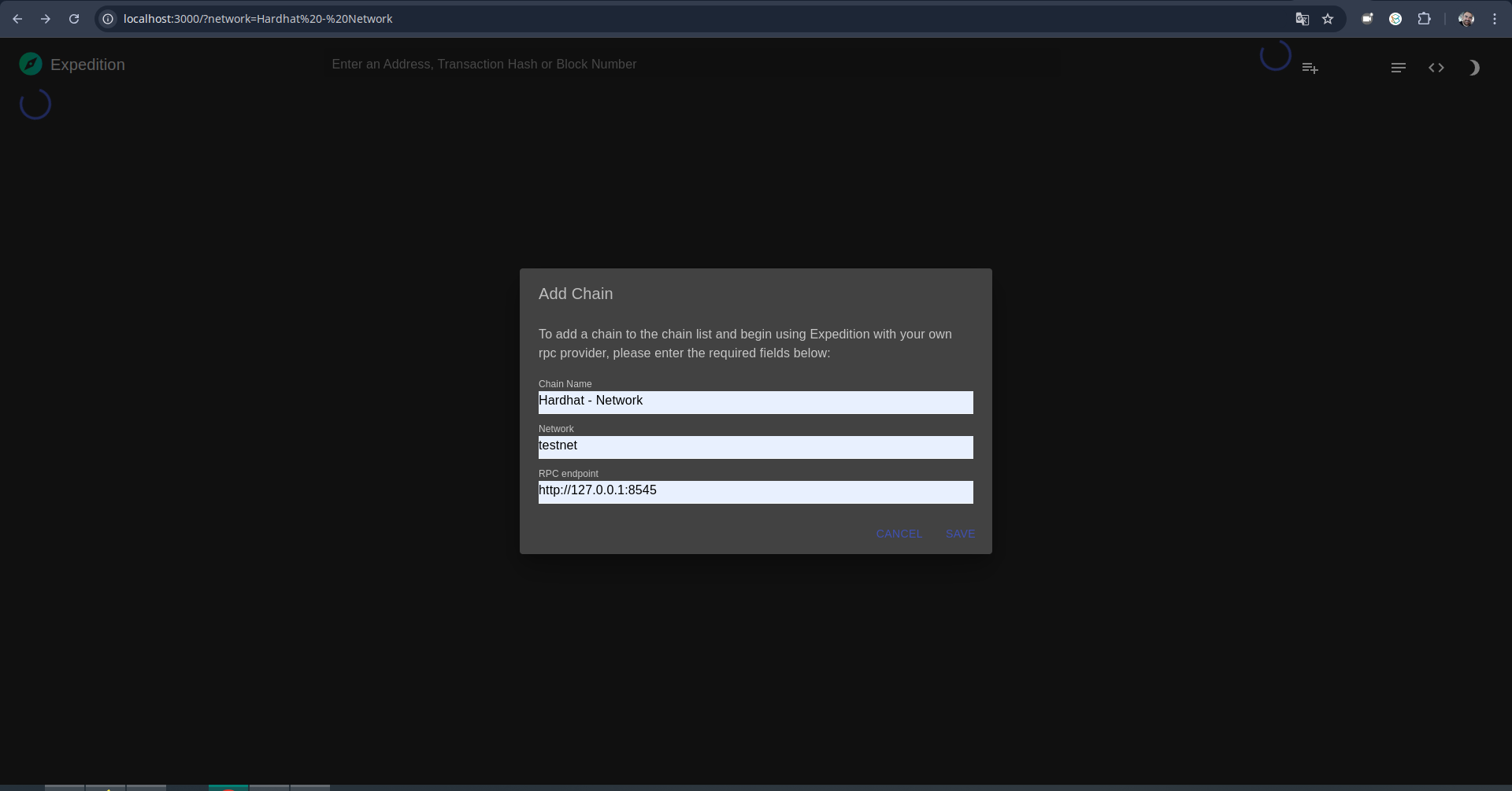
Acessando as informações da rede Hardhat no expedition.
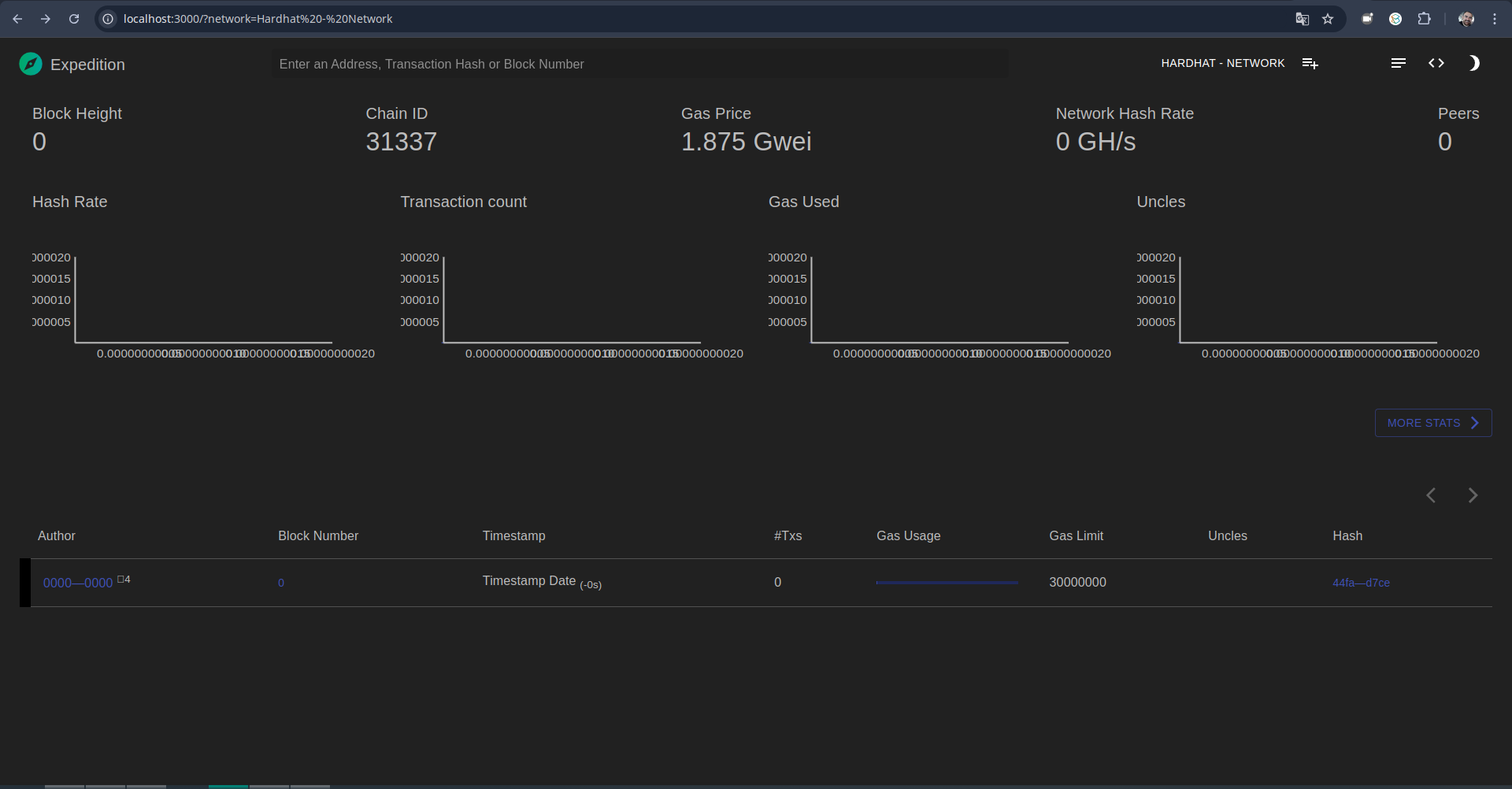
Ao ser configurada a rede no expedition irão aparecer as mensagens de sincronização no terminal em que a rede do hardhat foi iniciada.
eth_blockNumber
net_peerCount
eth_chainId
eth_gasPrice
eth_getBlockByNumber (3)
eth_blockNumber
eth_syncing
eth_blockNumber
eth_syncing
eth_blockNumber (2)
eth_syncing
eth_blockNumber
eth_syncing
eth_blockNumber (2)
eth_syncing
eth_blockNumber
eth_syncing
eth_blockNumber
eth_syncing
eth_blockNumber (2)
eth_syncing
eth_blockNumber
eth_syncing
eth_blockNumber (2)
eth_syncing
eth_blockNumber
eth_syncing
eth_blockNumber (2)
eth_syncing
eth_blockNumber
eth_syncing
eth_blockNumber
eth_syncing
eth_blockNumber (2)
eth_syncing
eth_blockNumber
eth_syncing
eth_blockNumber (2)
eth_syncing
eth_blockNumber
eth_syncing
eth_blockNumber (2)
eth_syncing
eth_blockNumber
eth_syncing
eth_blockNumber
eth_syncing
eth_blockNumber (2)
eth_syncing
eth_blockNumber
eth_syncing
eth_blockNumber (2)
eth_syncing
eth_blockNumber
eth_syncing
eth_blockNumber (2)
eth_syncing
eth_blockNumber
eth_syncing
eth_blockNumber (2)
...
Vamos adicionar a rede Hardhat Network e as duas primeiras contas no Metamask:
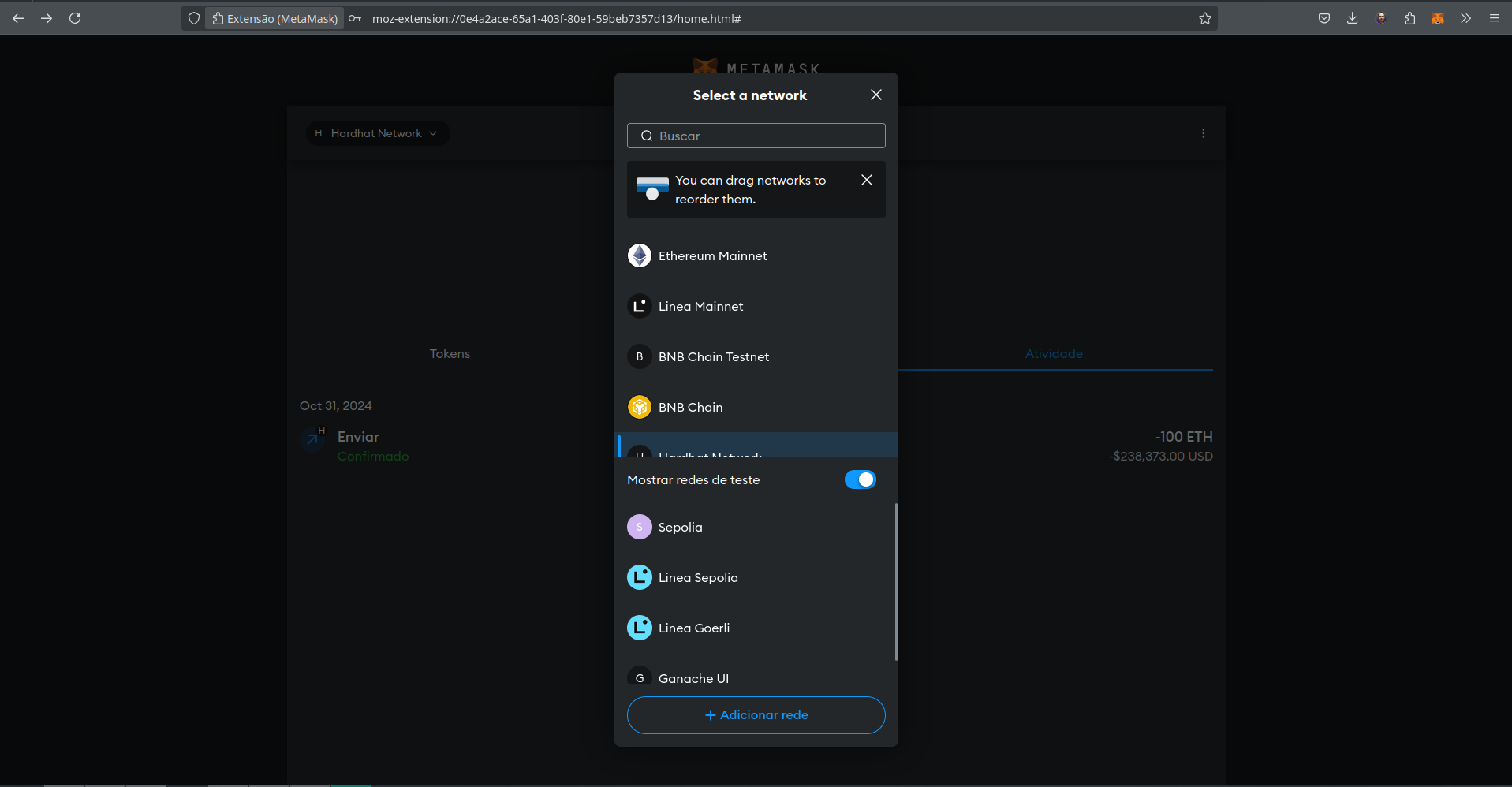
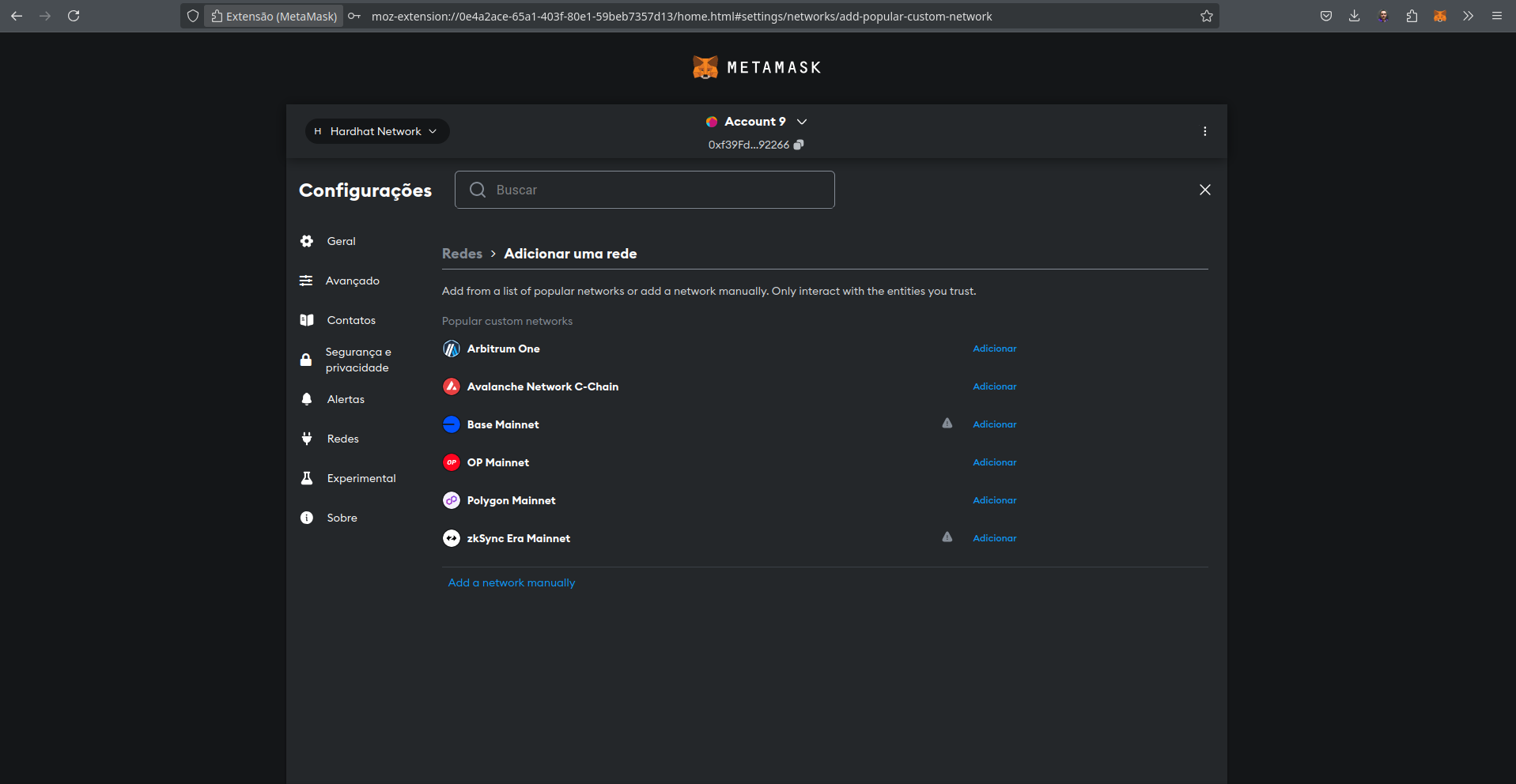
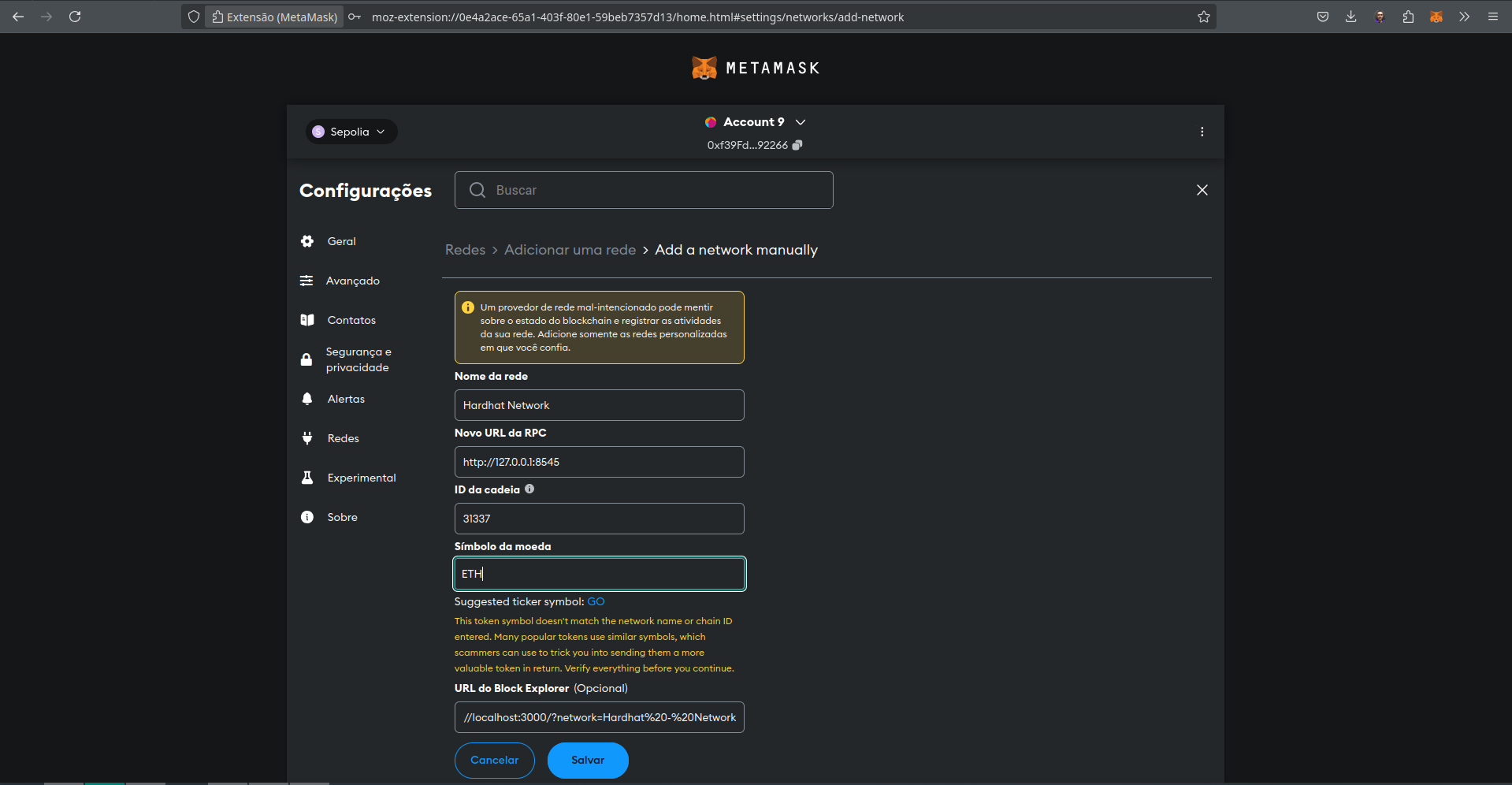
Adicionando as contas da Rede do Hardhat no Metamask:
Account #0: 0xf39Fd6e51aad88F6F4ce6aB8827279cffFb92266 (10000 ETH)
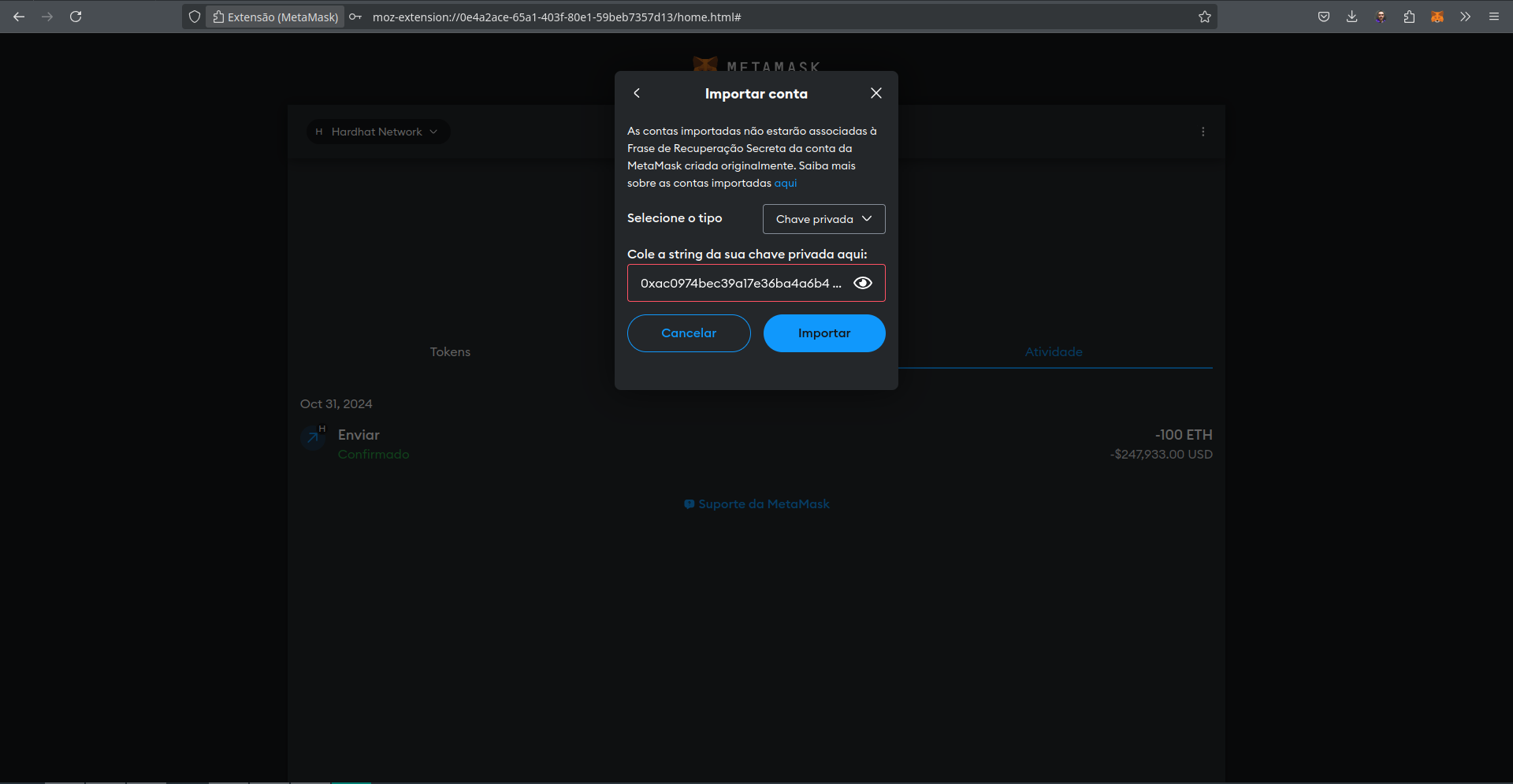
Private Key: 0xac0974bec39a17e36ba4a6b4d238ff944bacb478cbed5efcae784d7bf4f2ff80

Account #1: 0x70997970C51812dc3A010C7d01b50e0d17dc79C8 (10000 ETH)
Private Key: 0x59c6995e998f97a5a0044966f0945389dc9e86dae88c7a8412f4603b6b78690d
Na lista de contas do Metamask adicione as duas contas utilizando a chave privada gerada pelo Hardhat para a rede simulada.
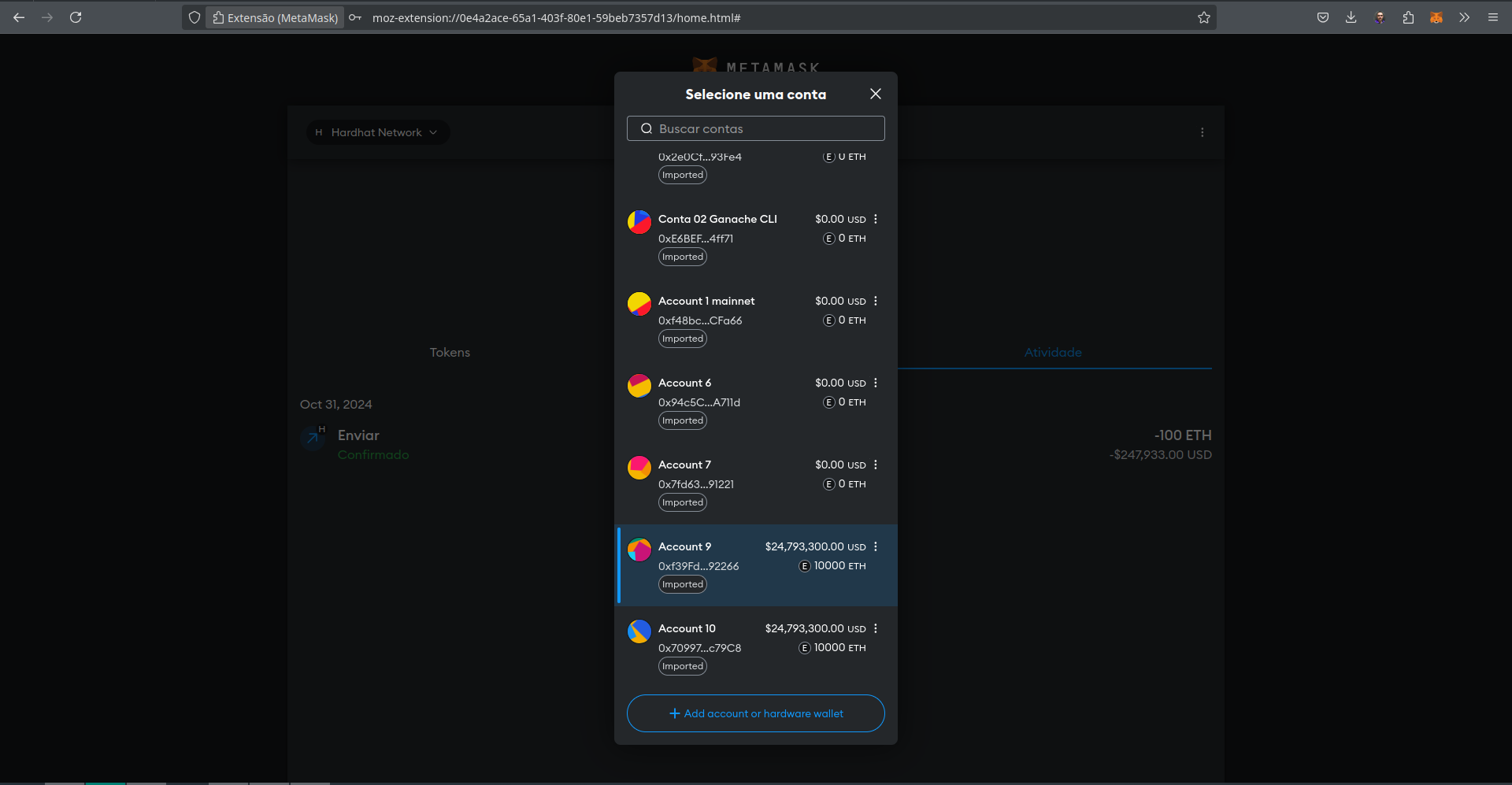
Todas as contas foram criadas e inicializadas com \(10000 ETH\). Vamos enviar um valor da Account 9 para a Account 10.
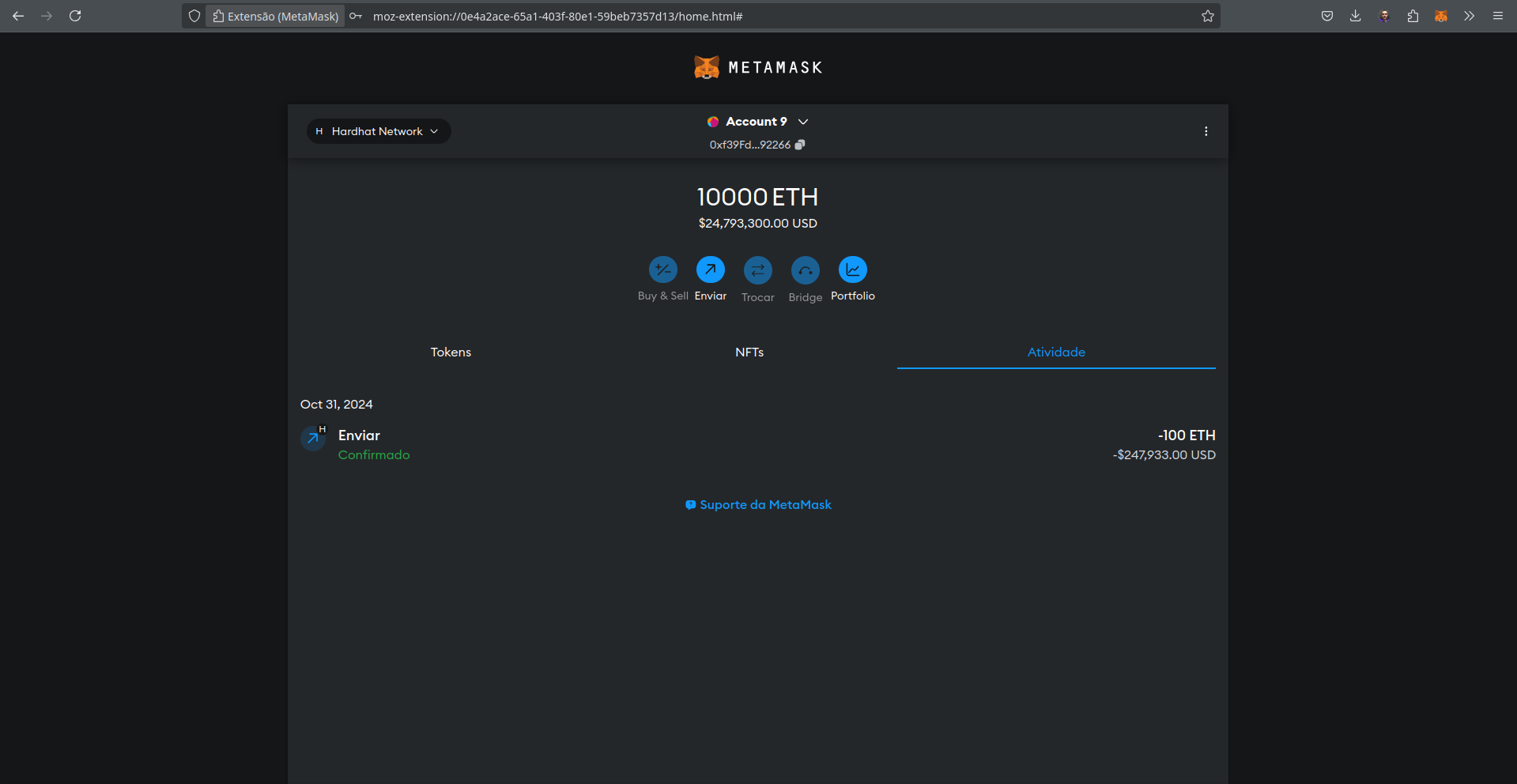
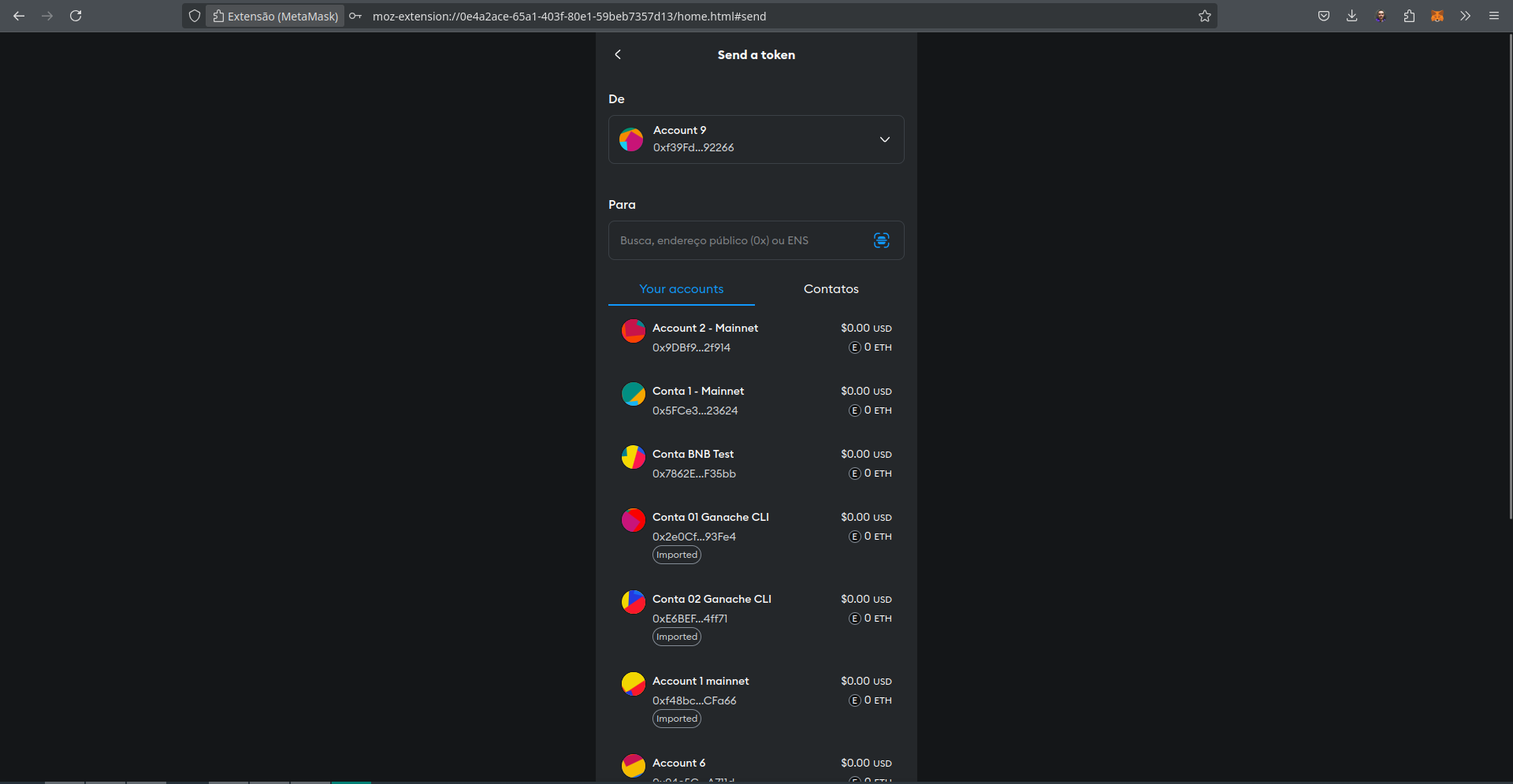
Selecionamos a conta que irá receber a transferência, no exemplo a Account 10.
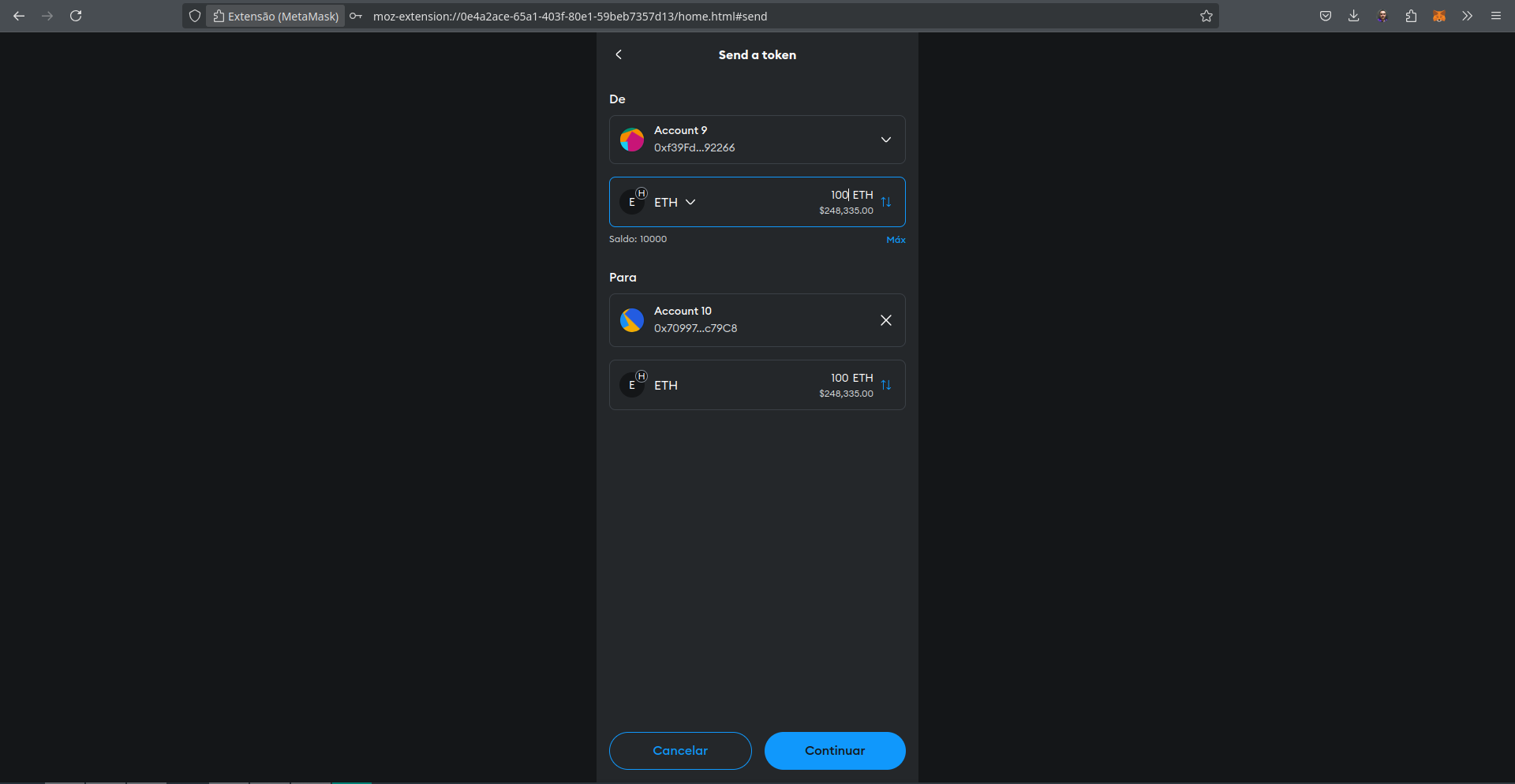
Indicamos o valor de \(100 ETH\) a ser transferido e clicamos em continuar.
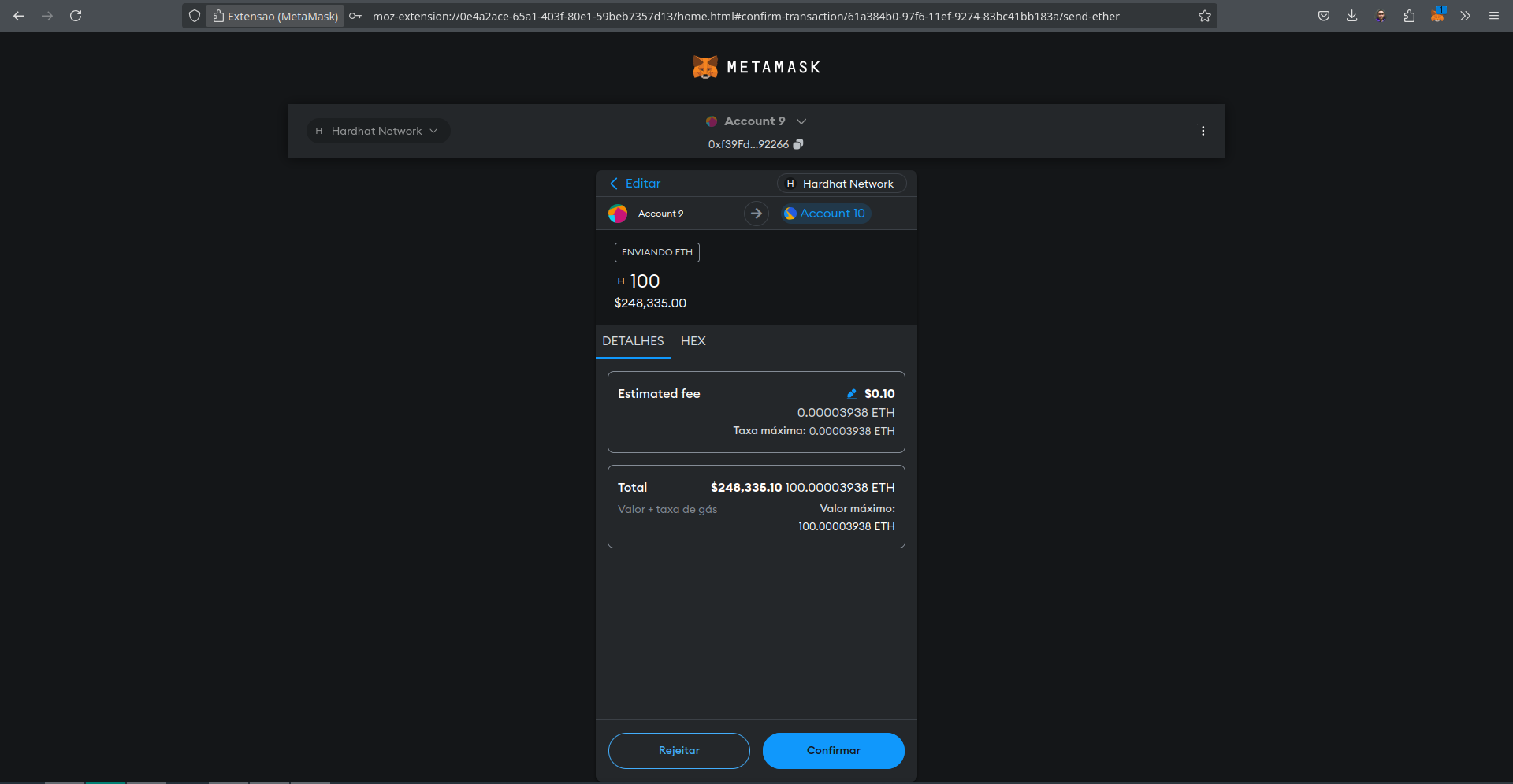
Após o envio será necessário confirmarmos a transação.
O registro da transação enviada irá aparecer no console onde a rede simulada está executando.
eth_blockNumber (2)
eth_sendRawTransaction
  Transaction: 0xdf06078a30c28d74d25d75934d714b69229f4e0119123e6c4a9069d6a886032c
  From:        0xf39fd6e51aad88f6f4ce6ab8827279cfffb92266
  To:          0x70997970c51812dc3a010c7d01b50e0d17dc79c8
  Value:       100 ETH
  Gas used:    21000 of 21001
  Block #1:    0x46701cf40a4890d9865c4e29b4c9d1b92caadb0a3c5e48d581880cb1fdb6867d

eth_blockNumber
eth_getBlockByNumber
eth_getTransactionReceipt
eth_getBalance (10)
eth_getBlockByHash
eth_gasPrice
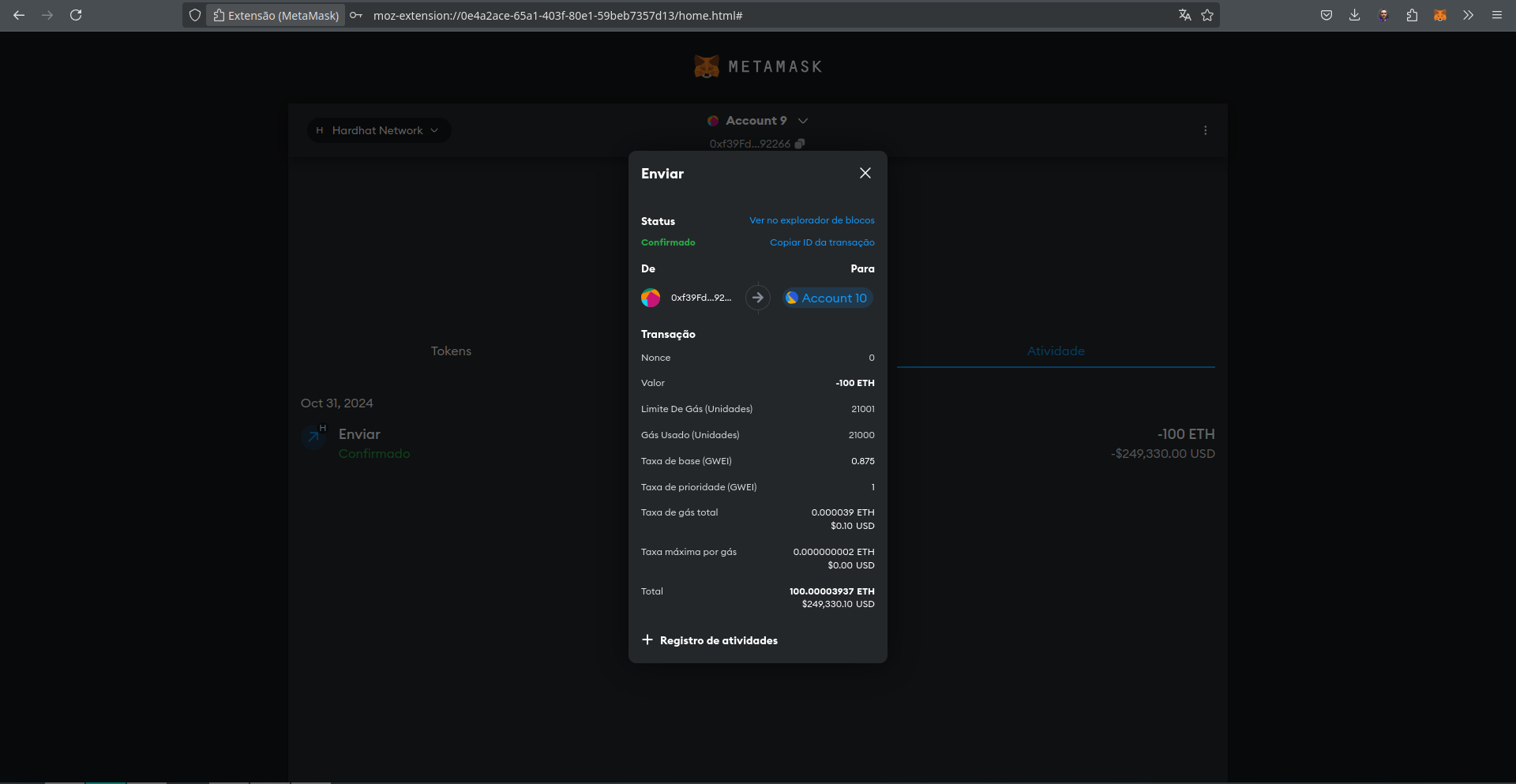
Na interface do Metamask irá aparecer que a transação foi confirmada.
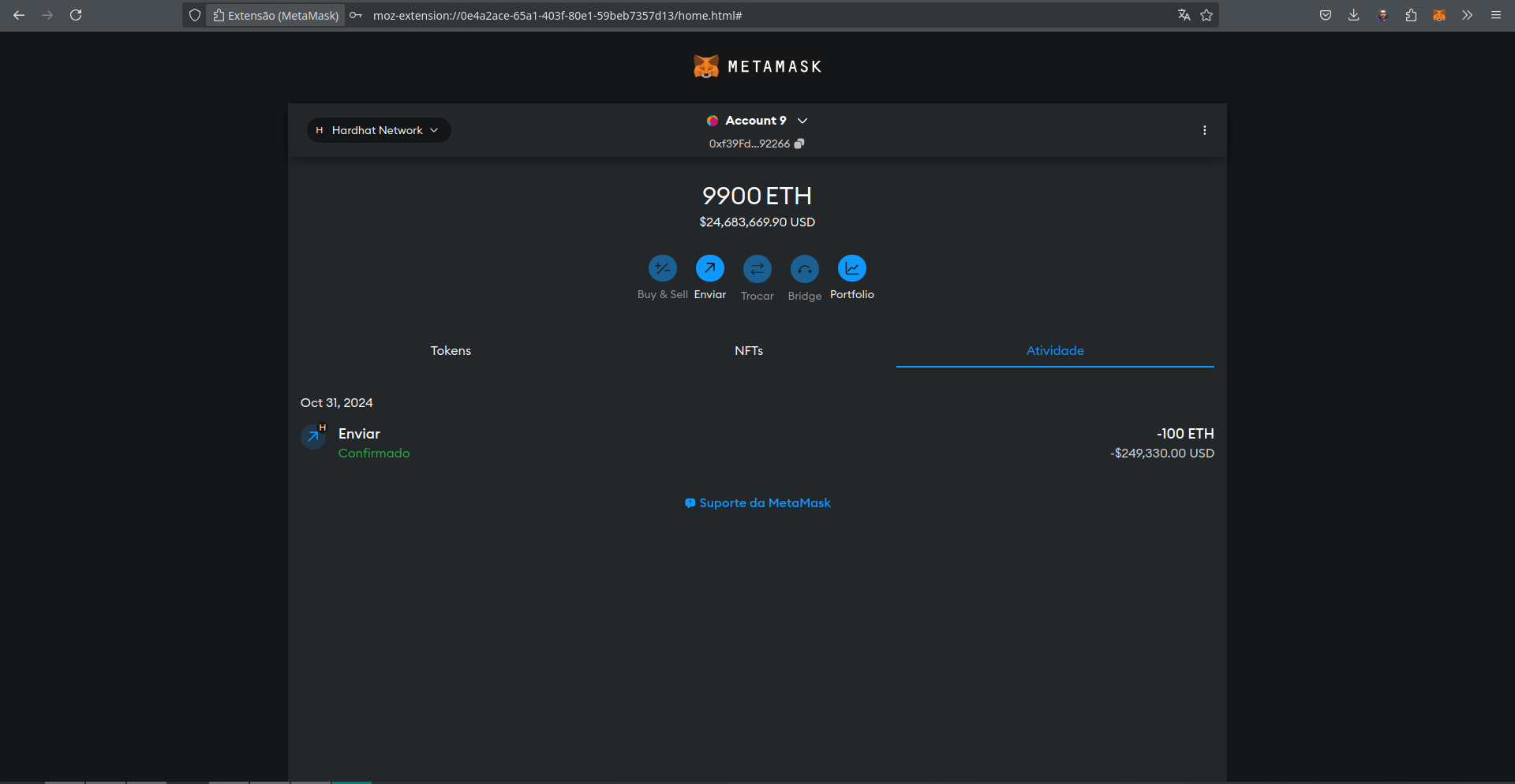
E clicando sobre o status de confirmação podemos acessar os detalhes da transação "Ver no explorador de blocos" que irá para o link no expedition. Ou podemos copiar o ID da transação 0xdf06078a30c28d74d25d75934d714b69229f4e0119123e6c4a9069d6a886032c e pesquisar na consulta do expedition.
A lista de blocos pode ser acessada na interface do expedition.
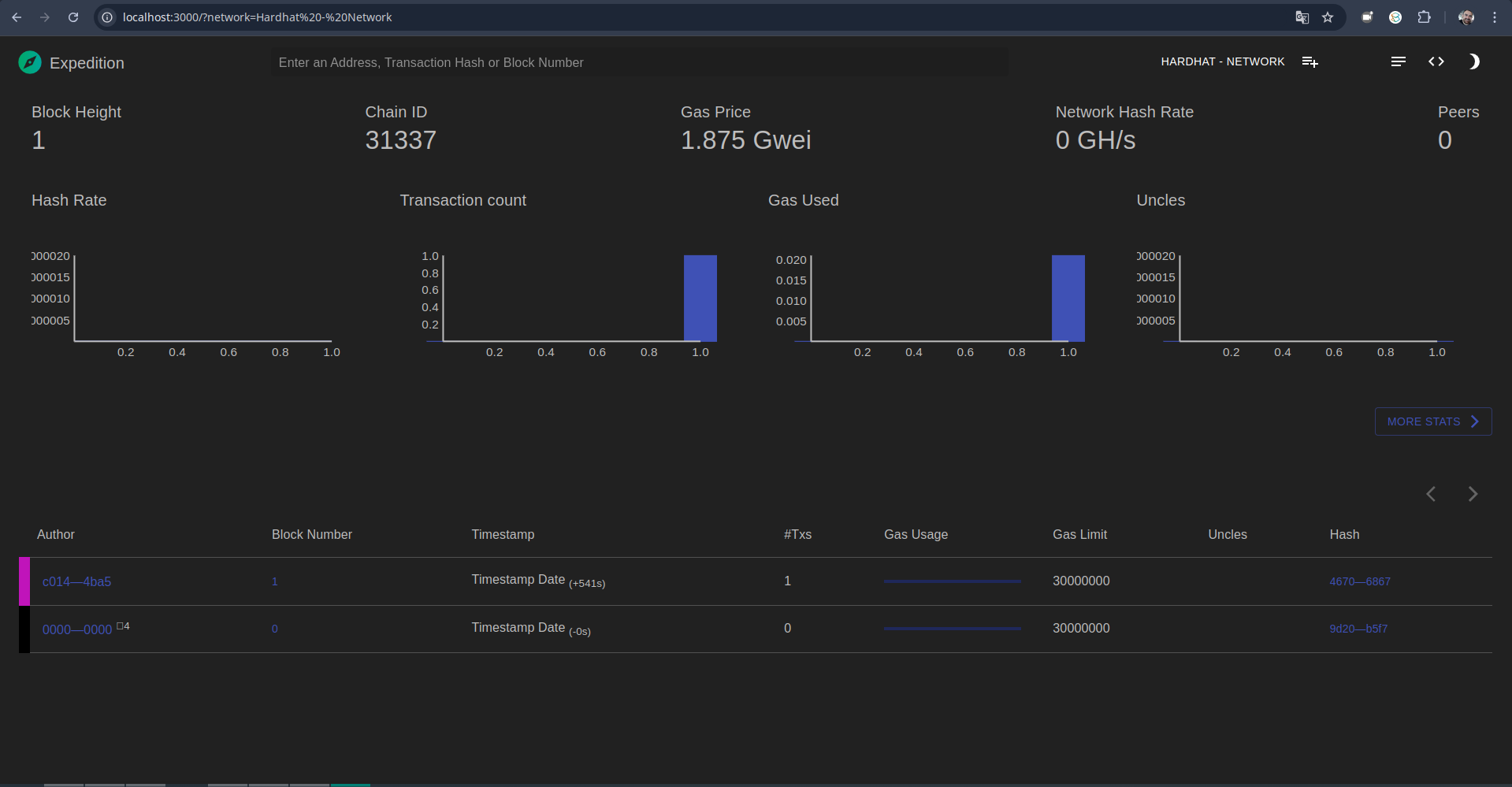
As informações do bloco \(1\) podem ser acessadas pelo link na coluna Block number http://localhost:3000/block/0x46701cf40a4890d9865c4e29b4c9d1b92caadb0a3c5e48d581880cb1fdb6867d?network=Hardhat%20-%20Network.
As informações do bloco irão ser apresentadas na interface do expedition.
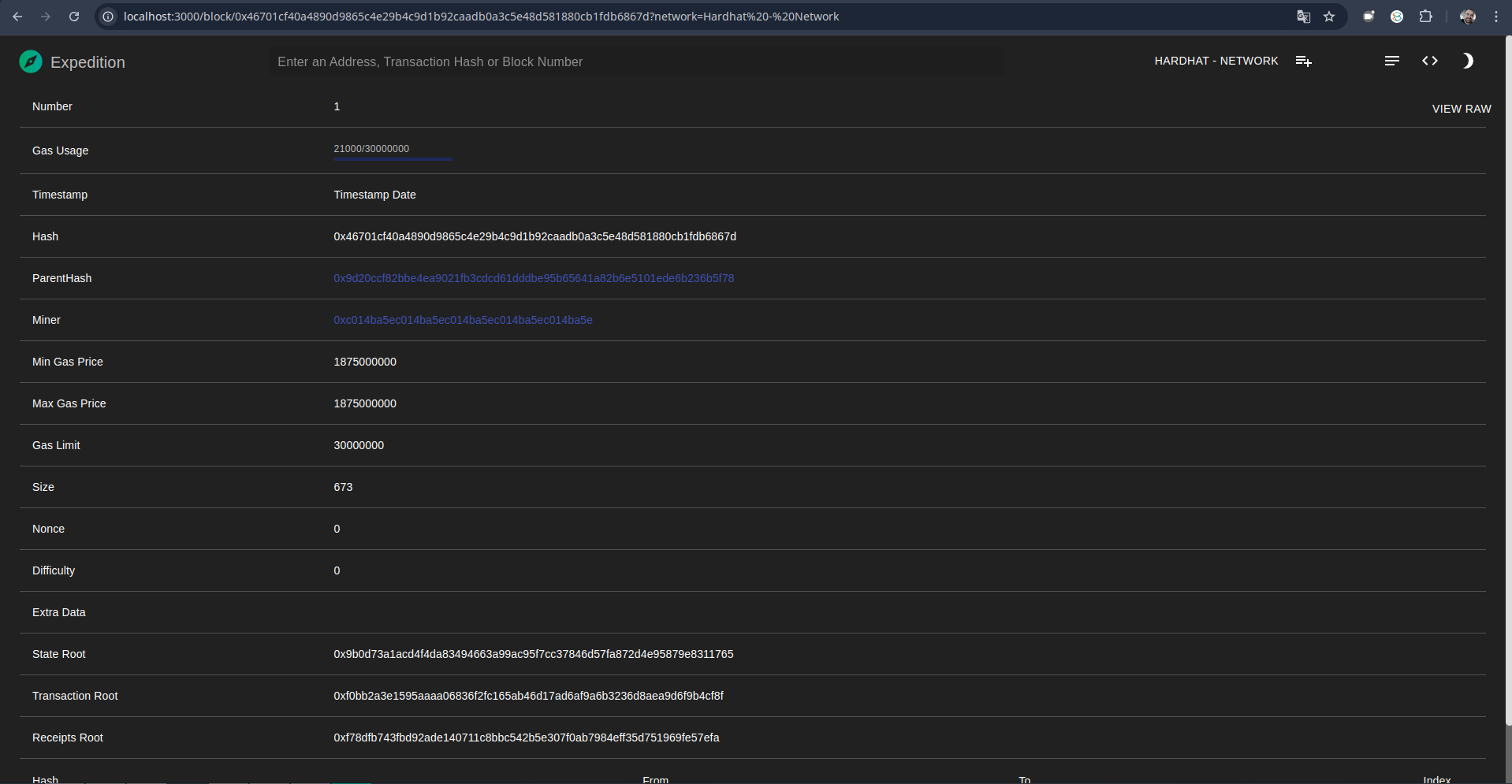
Clicando sobre a transação, as informações serão apresentadas.
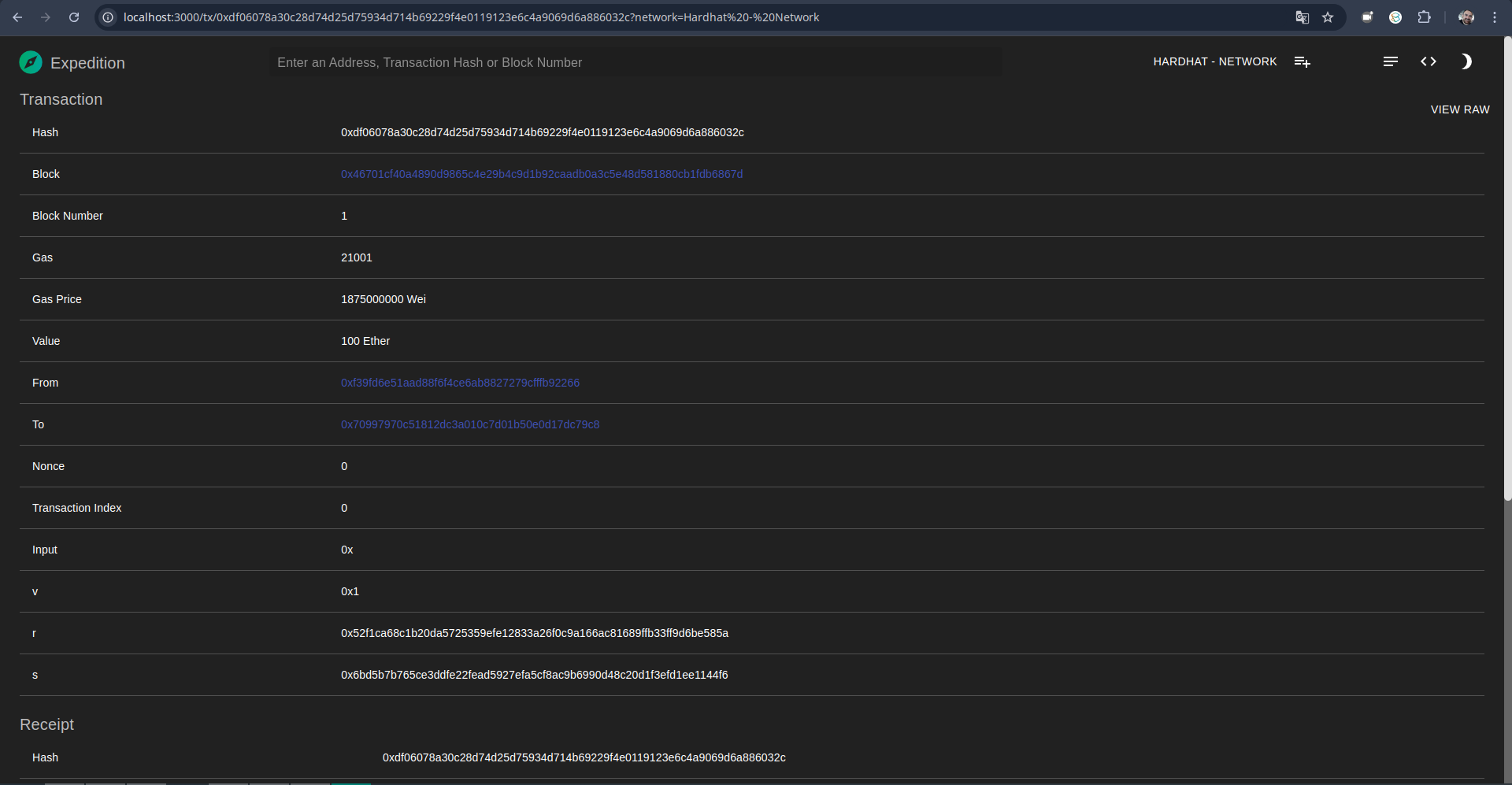
0xdf06078a30c28d74d25d75934d714b69229f4e0119123e6c4a9069d6a886032cSe no console da rede simulada do Hardhat aparecer a mensagem:
eth_sendRawTransaction

  Nonce too high. Expected nonce to be 0 but got 1. Note that transactions can't be queued when automining.
É só ir no Metamask em Configurações, então em Avançado e clique em Clear activity and nonce data.
12.7 Considerações Finais
Nesta aula vimos uma introdução ao uso do hardhat para fazer testes e deploy de contratos inteligentes em redes locais e de testes.
12.8 Leitura Recomendada
Capítulo 15: Introducing Web3
13 Word Cloud